Your inbox, finally working for the business.
pEntities-Email is the Outlook add-in that puts every email exactly where it belongs: in SharePoint, OneDrive and Teams, filed against the right client, case or project, and summarised, ticketed and automated by AI. One click from the message you are reading. Free to start, now on the Microsoft Marketplace.
- Outlook on the web, Windows & Mac
- Data stays in your Microsoft 365
- No AI in the free edition
Email is where the work arrives. pEntities-Email makes sure it never gets lost there.
Contracts, invoices, client decisions, approvals - the most important records of your business land in someone's inbox and stay there, invisible to everyone else. pEntities-Email ends that. From a pane right beside the message, your people save emails and attachments to the place the team actually works, with the details that make them easy to find months later.
Nothing to migrate, nothing to trust blindly. Emails are saved as files in your own Microsoft 365 - read and written with your own account - so the permissions you already have in SharePoint, OneDrive and Teams keep applying. The add-in keeps no copy and holds no database of your email.
Free for everyone, extraordinary with Premium. The free edition works for anyone with a Microsoft 365 work or school account. Add pEntities Premium and the same pane connects every email to your pEntities records, then brings in AI summaries, data extraction, tickets, shared desks and automation.
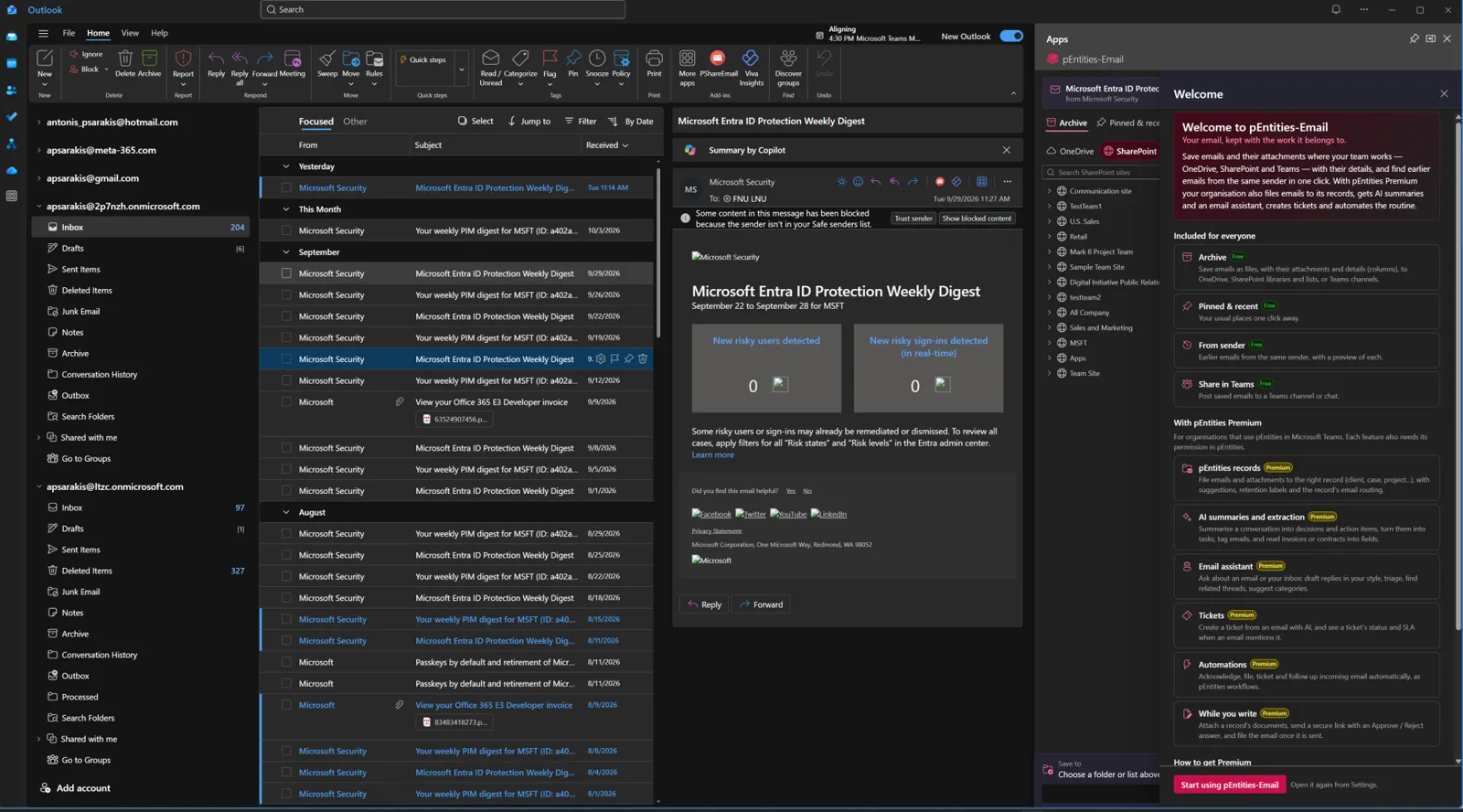
Save, find and share email where your team really works
No subscription, no time limit, no AI touching your content. Just the fastest way to get an email and its attachments out of one person's inbox and into the shared place everyone can find it.
Archive anything, anywhere in Microsoft 365
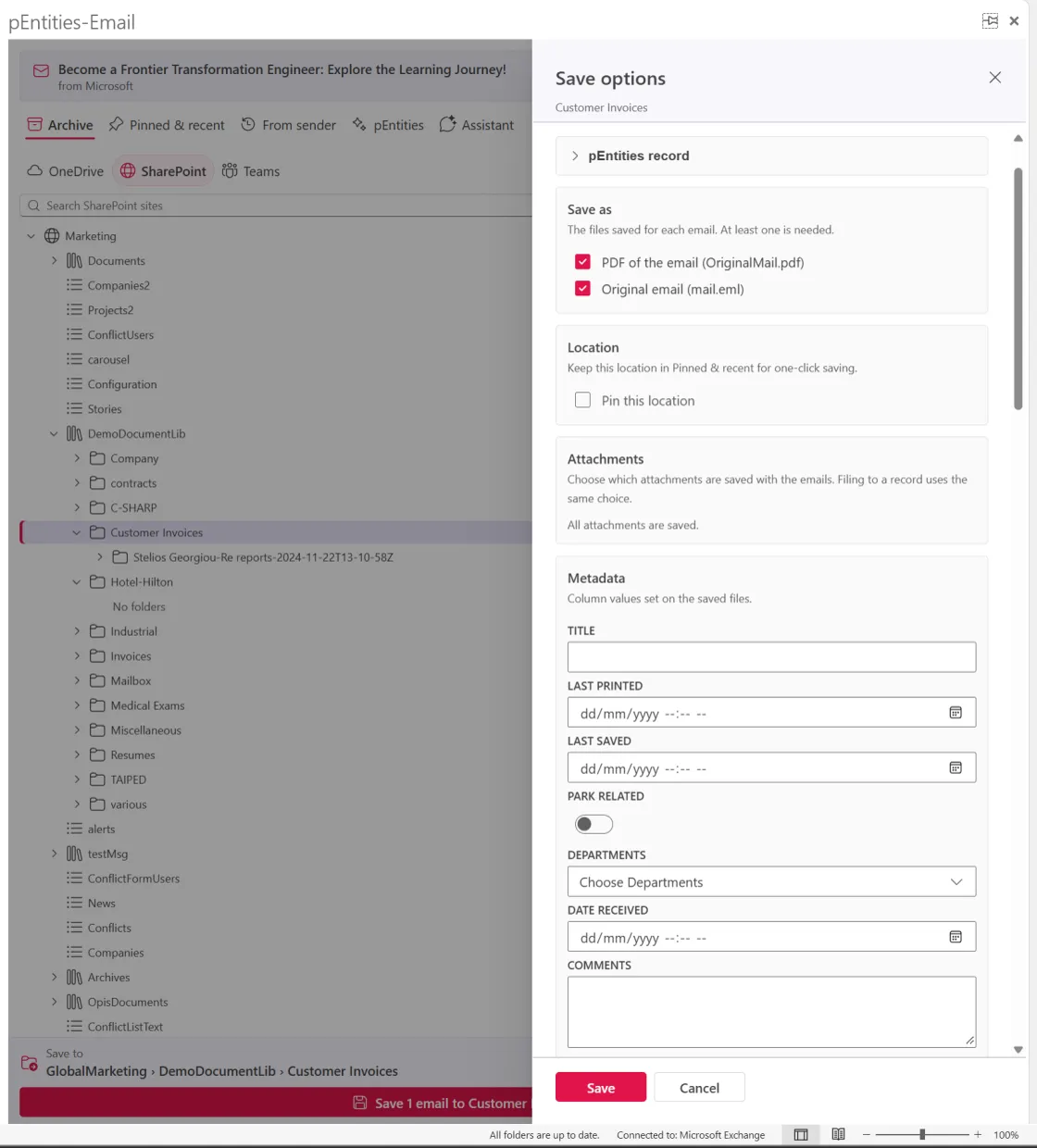
Pick OneDrive, SharePoint or a Teams channel, open the tree to the folder or list you want, and save. Each email lands in its own neatly named folder - as a readable PDF for people without Outlook, the original .eml, the Outlook .msg, or all three - with all its attachments or just the ones you tick.
Fill in the destination's columns while you save: text, choices, dates, people, managed metadata. Save to a SharePoint list and the subject, sender, recipients and body fill themselves in. Your documents arrive organised, not dumped.
Bulk, drag-and-drop and on autopilot
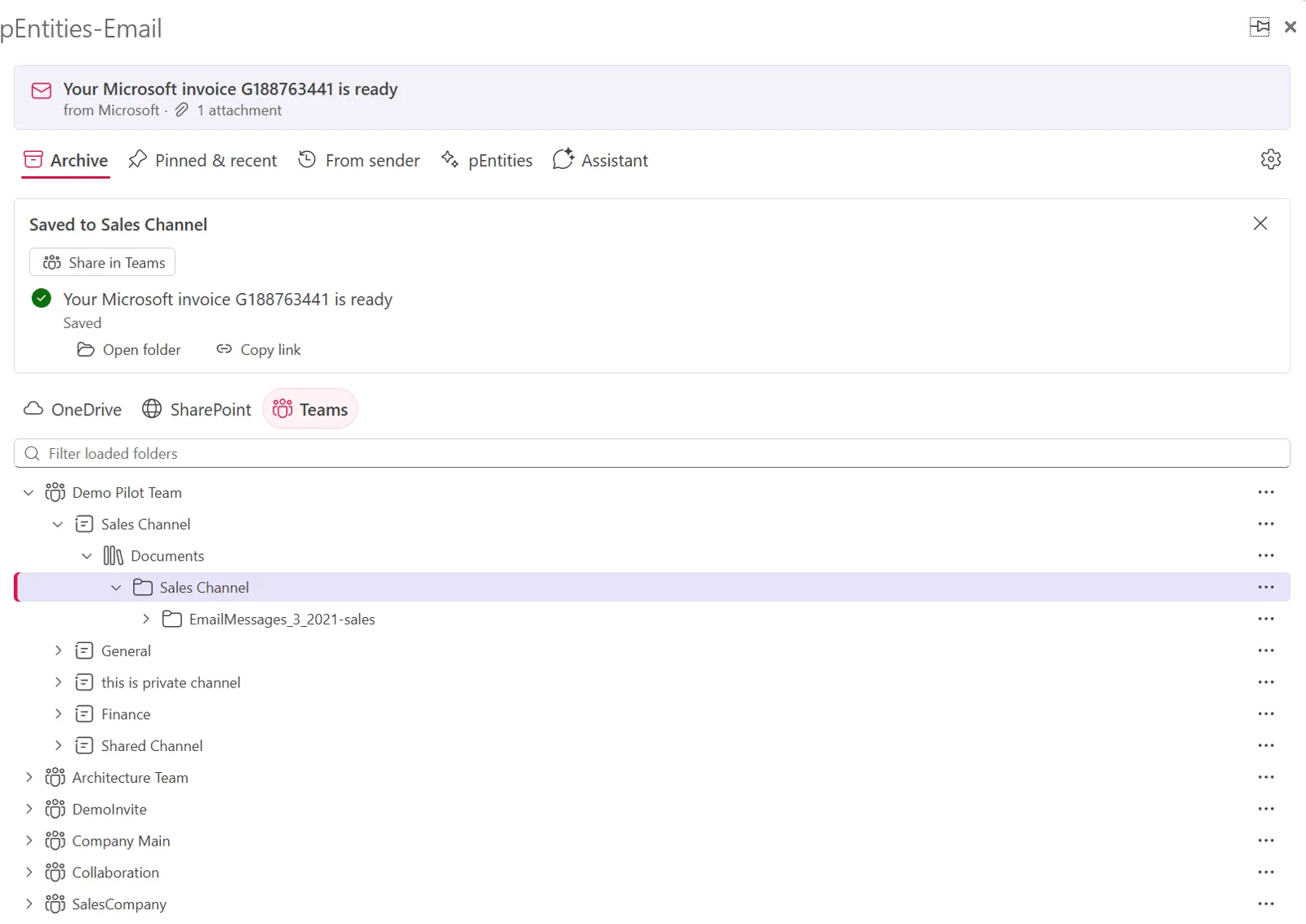
Select a dozen emails and save them all at once, each in its own folder. Drag emails or attachments straight from Outlook onto the pane. Point an Outlook folder at a destination and its new emails are saved automatically - or sweep a whole folder from the last month, quarter or year in one pass.
Pinned & recent keeps your favourite destinations one click away, and pictures shared by a thread are stored once, not a hundred times.
The full story with every sender
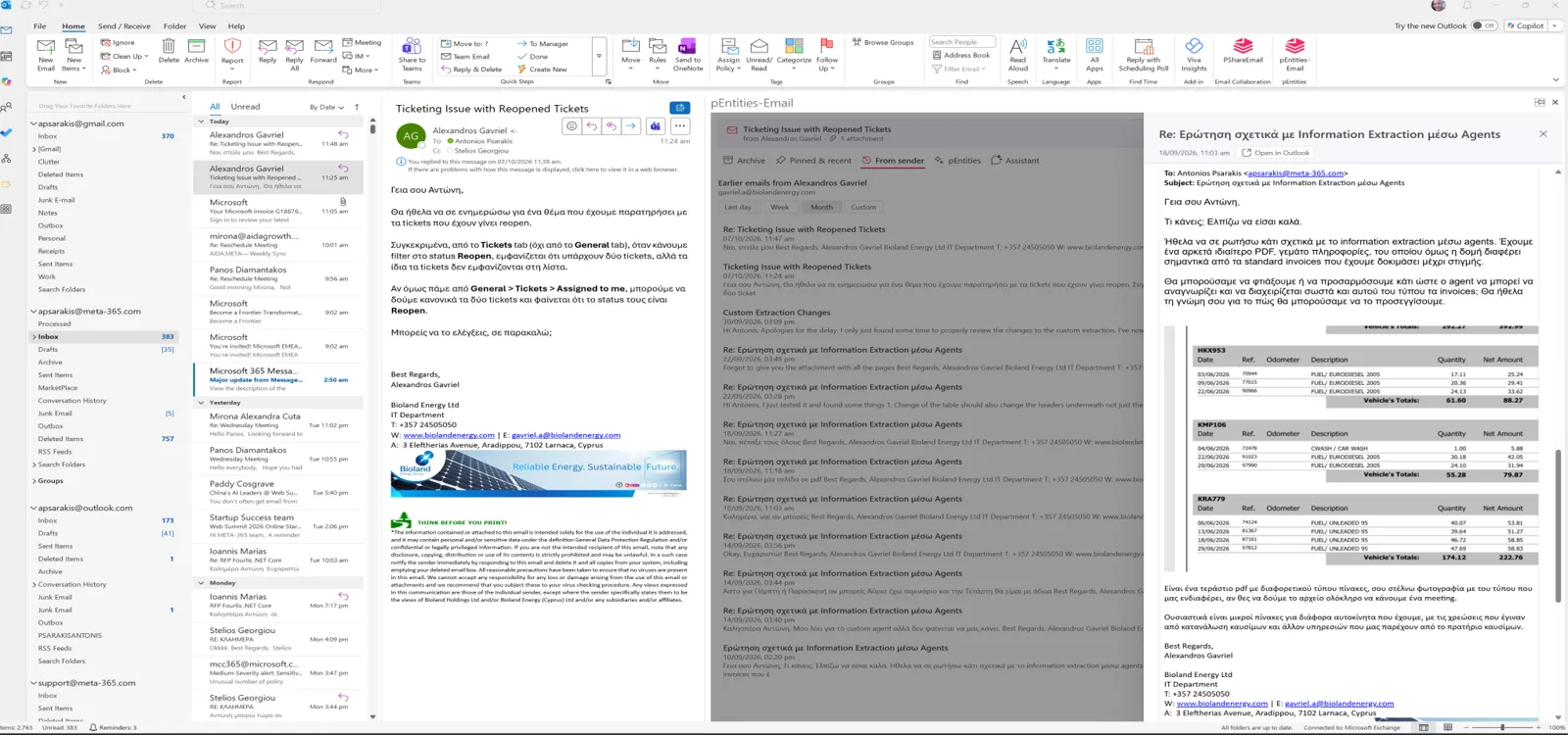
From sender lists every earlier email from the person you are reading - and, if you like, the ones you sent them - with a wide, full-fidelity preview and one-click access to their attachments. Context in seconds, not a search session.
Find in Microsoft 365 searches SharePoint, Teams and OneDrive without leaving Outlook, with the same filters as pEntities - then attaches a copy or inserts a link while you write.
From inbox to Teams conversation in one move
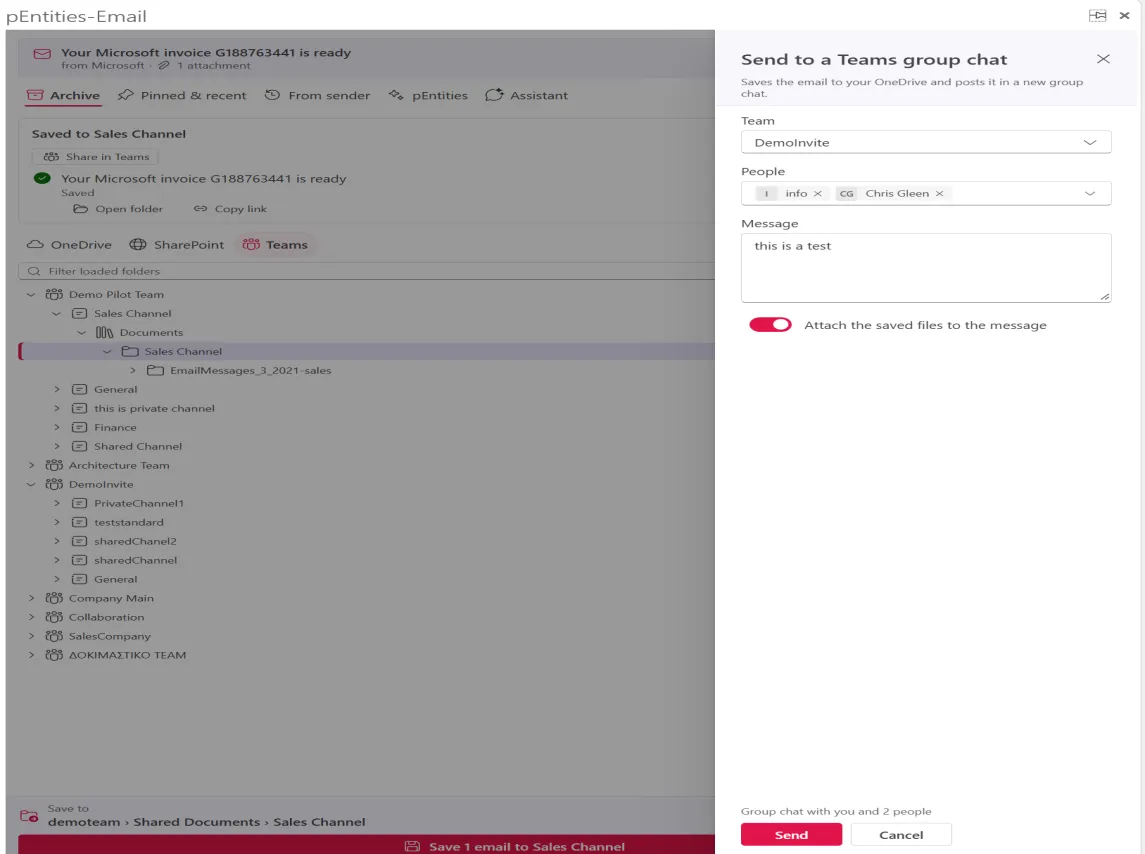
Pick colleagues from a team - or the whole team - write a message, and the emails are posted in a new Teams group chat with their files attached and view-only links. Decisions stop living in forwarded chains and start living where the team talks.
Every email filed to its client, case or project - then read, summarised and acted on by AI
For organisations running pEntities in Microsoft Teams, the same pane becomes the front door to your records. Conversations, attachments, tickets, tasks and workflows meet in one place - and the busywork around email quietly disappears.
The right record, suggested before you ask
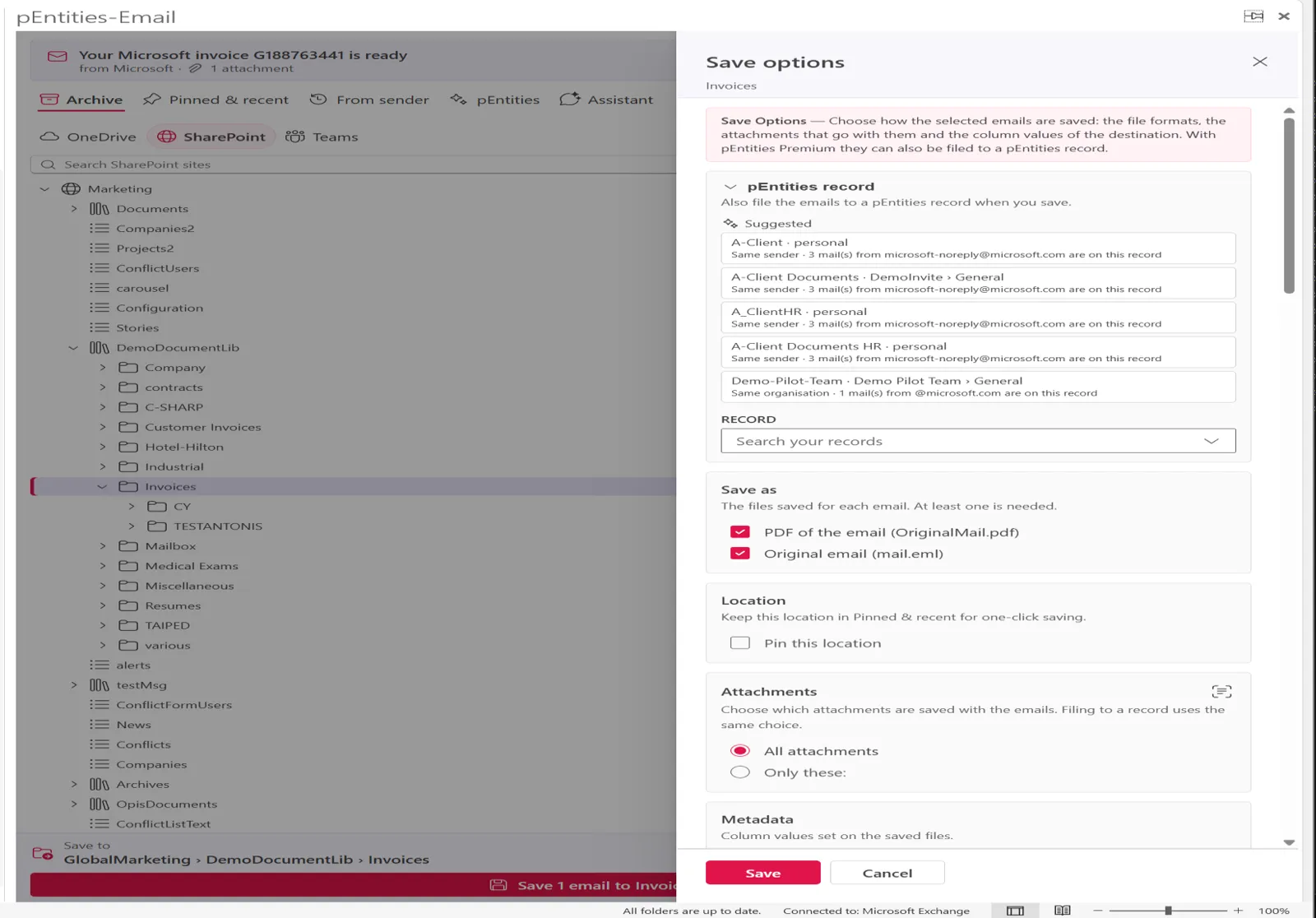
pEntities-Email recognises which client, case or project an email belongs to - from the ticket key, the conversation, the sender or their organisation - and files it with its attachments, a Microsoft Purview retention label and a short AI tag. Filed emails are marked in Outlook so everyone sees what is done.
The record card shows who is waiting for your answer, how active the relationship is, open tickets past their SLA, overdue tasks and expiring documents. To file rounds up the last two weeks of emails that belong to a record but are not on it yet - and files them in one go.
Attachments that fill in the forms themselves
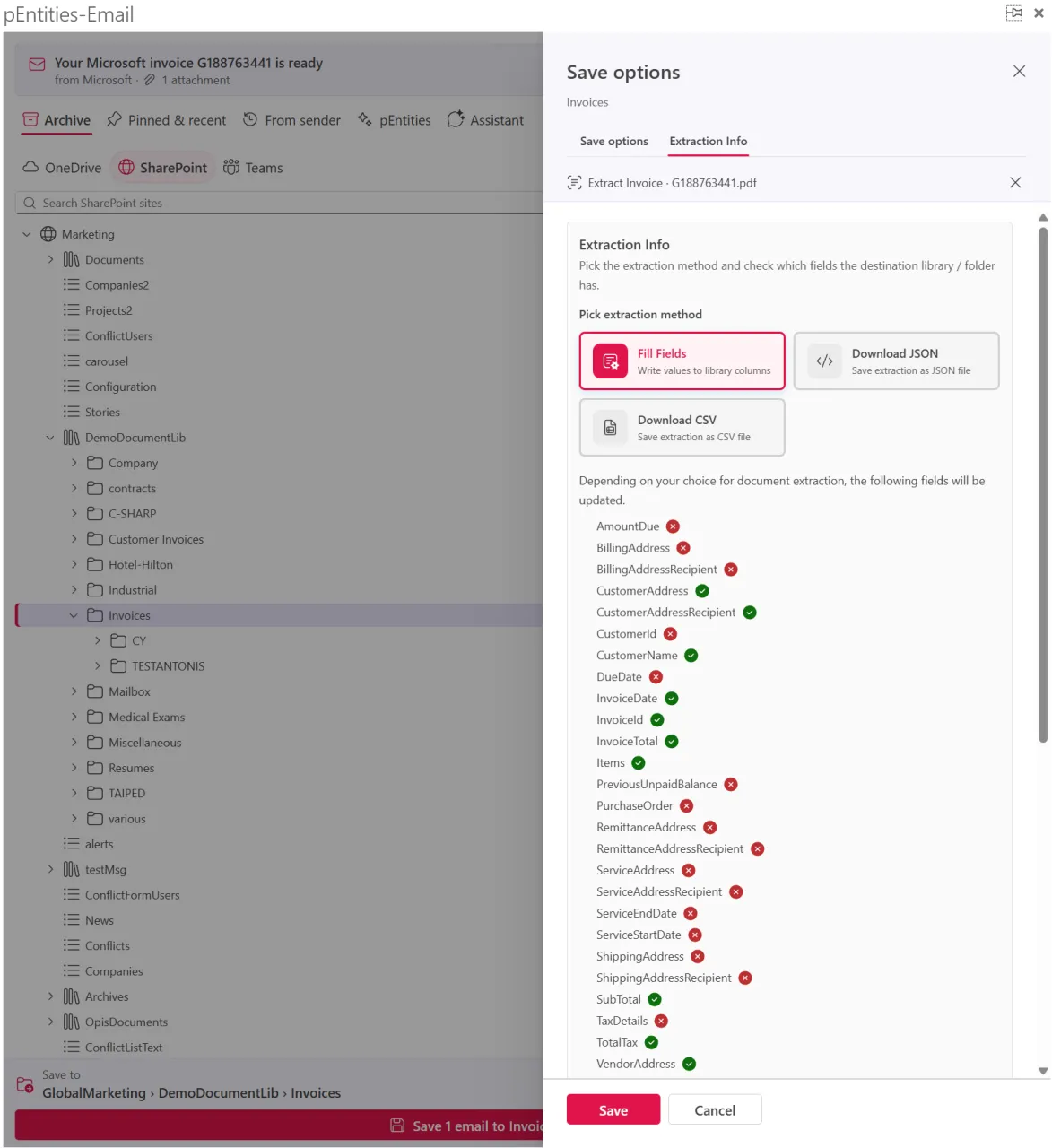
Invoices, receipts, contracts, identity documents - pEntities-Email reads the data and puts it where it is needed, so nobody retypes a thing. Fill your SharePoint columns directly, or download JSON or CSV. Your organisation's own custom mappings work exactly as they were designed.
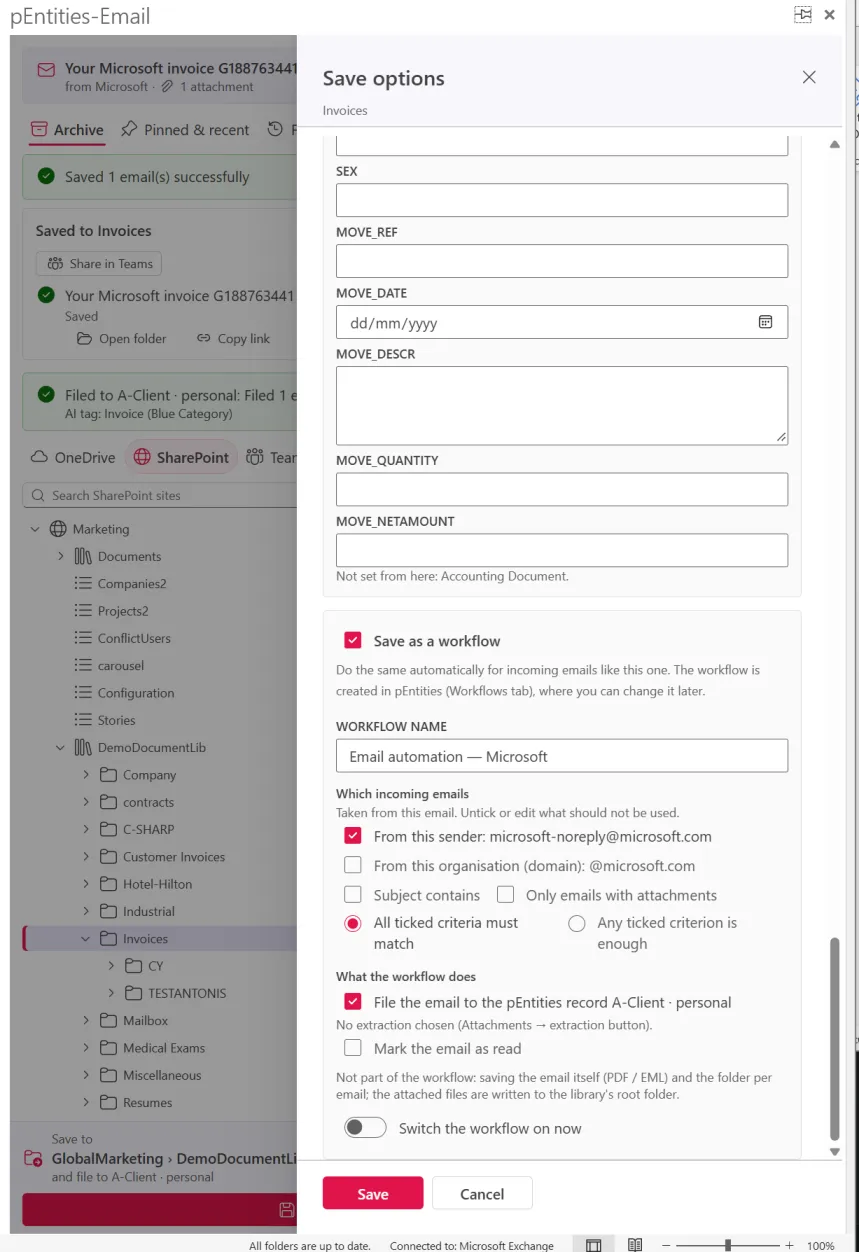
Then the magic: tick Save as a workflow and what you just did becomes a pEntities workflow that files, extracts and records every incoming email like this one - from this sender, this domain, or with these words in the subject. Teach it once. Never again.
Read a 50-message thread in ten seconds
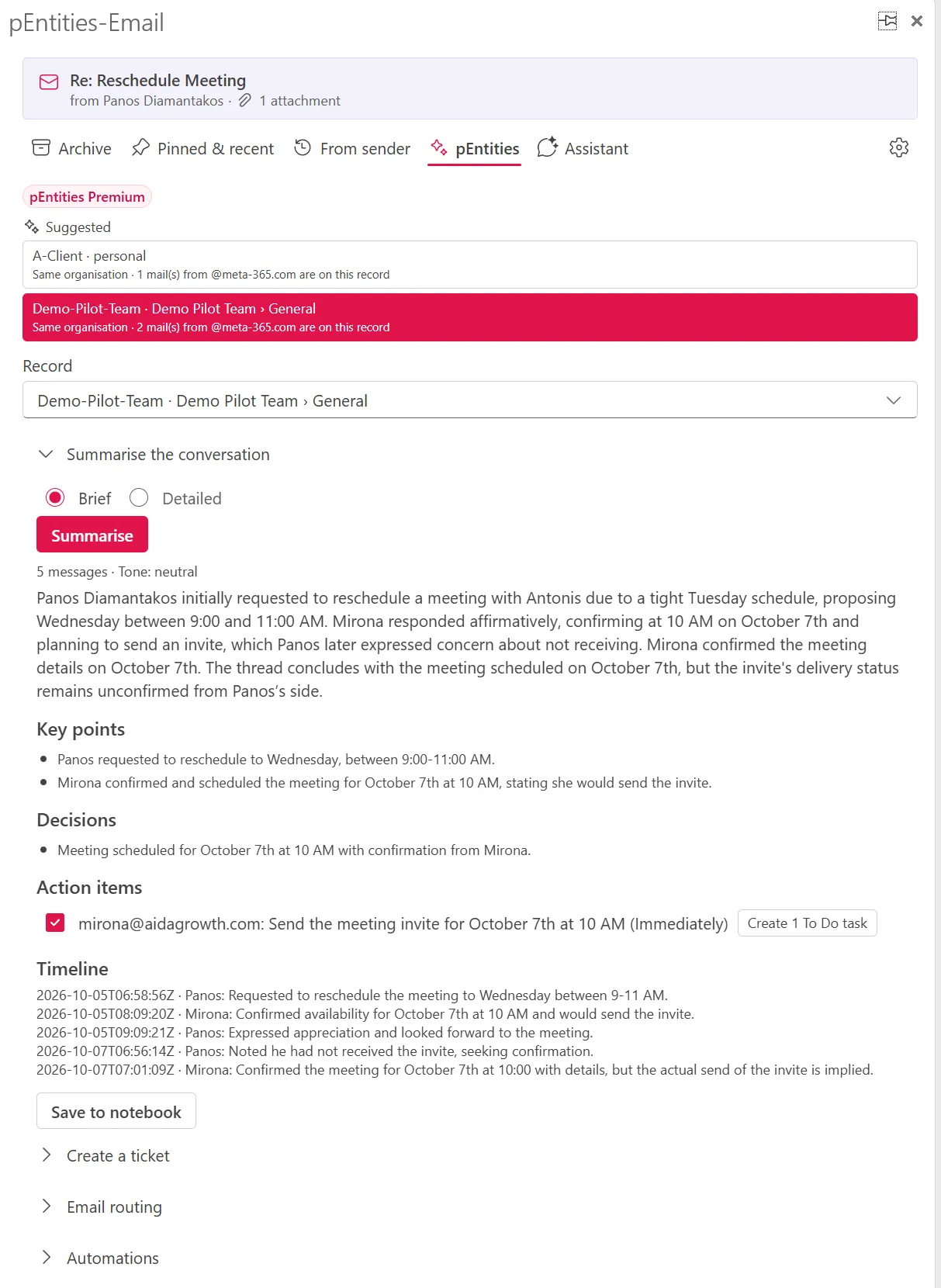
Summarise any conversation into participants, key points, decisions, action items and a timeline. Turn the action items into Microsoft To Do tasks with due dates, save the summary to the record's OneNote, or let the AI draft the reply in the language of the conversation - ready in Outlook's reply window, sent only when you say so.
Tickets, shared desks and automations - from the email itself
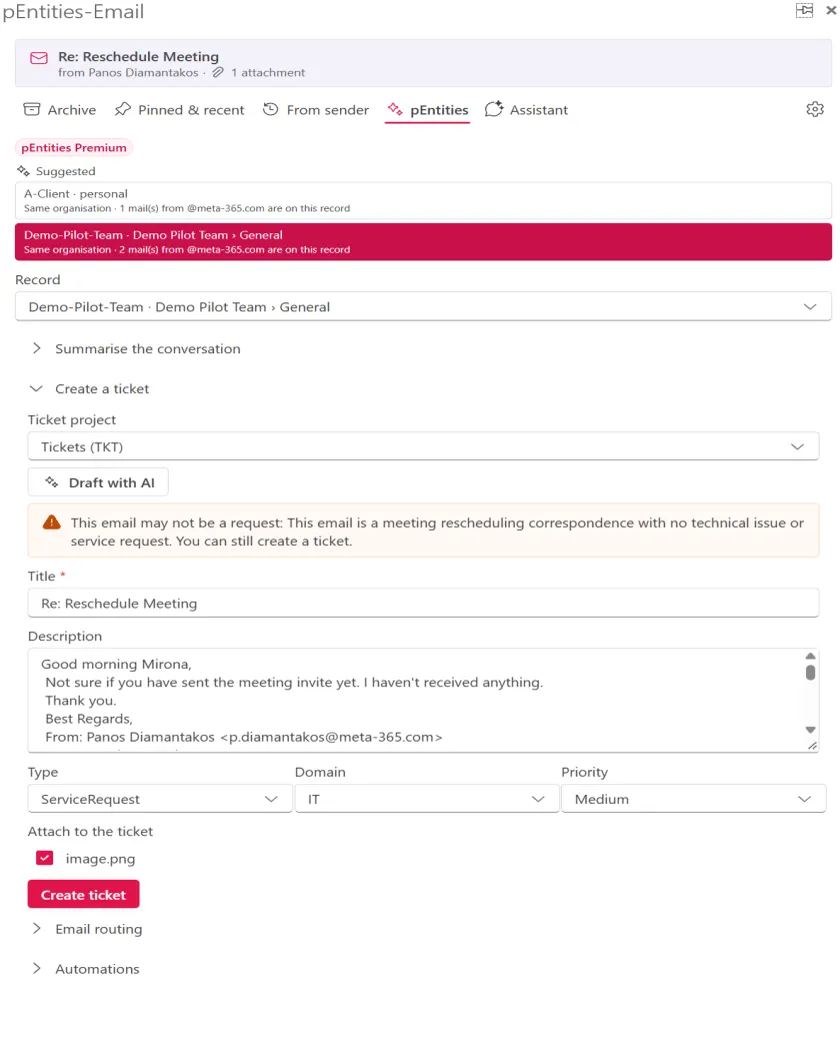
Create a ticket with AI in seconds and reply with its number. When an email mentions a ticket, its status, assignee and SLA appear right on top - change status, assign it to yourself, or add the email as a comment.
On shared mailboxes like invoices@ or support@, the desk card shows who is handling what. "I'm replying" stops two people answering the same customer, internal notes and @mentions keep the team in sync, and waiting times turn amber, then red, before anything is forgotten.
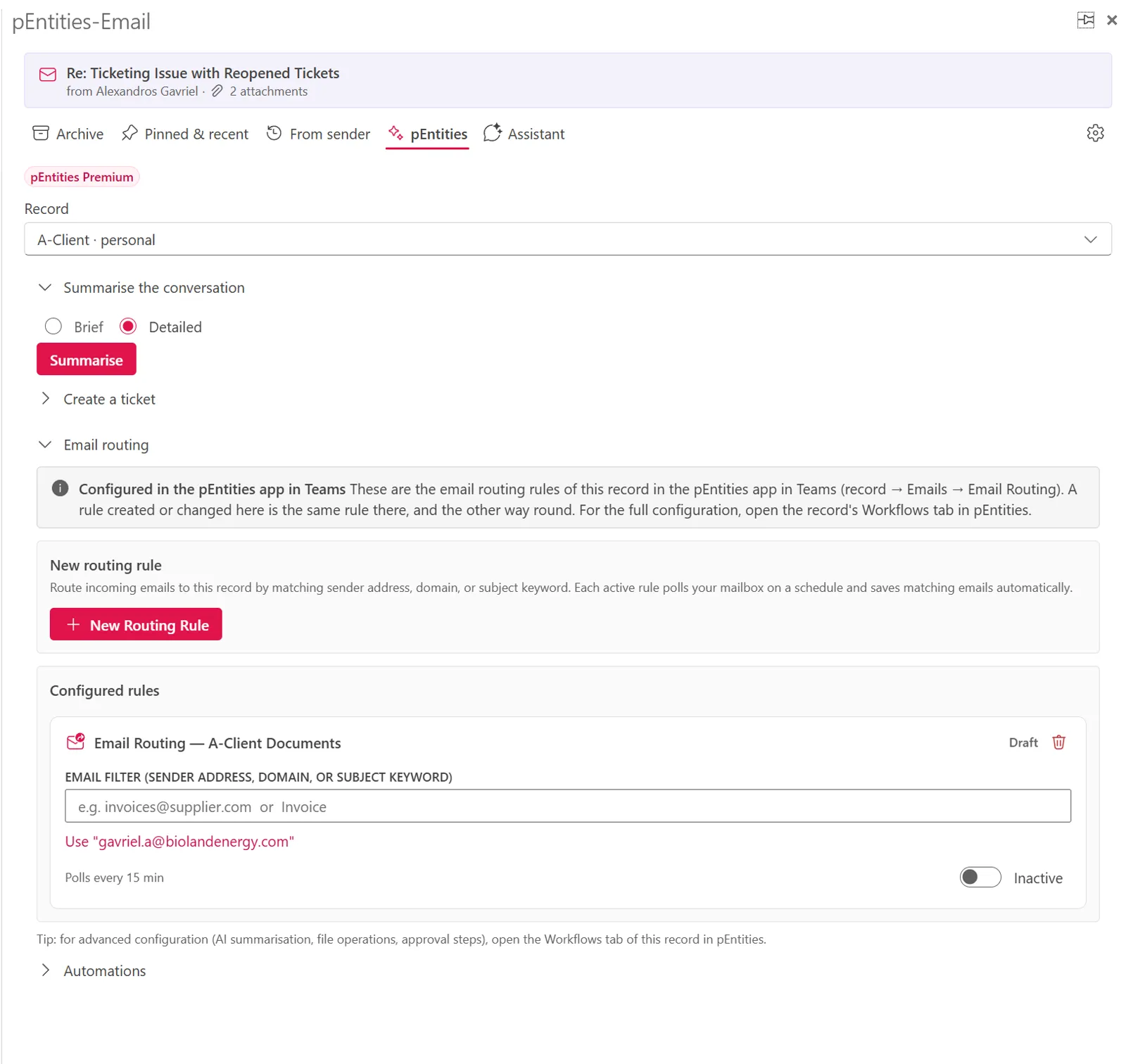
Ready-made automations set up from the open email: acknowledge automatically, create tickets from incoming mail, file to the record with an AI summary, or chase emails nobody answered. They run in pEntities as you - even with Outlook closed - with a full run history for every step.
"Triage my inbox." Done.
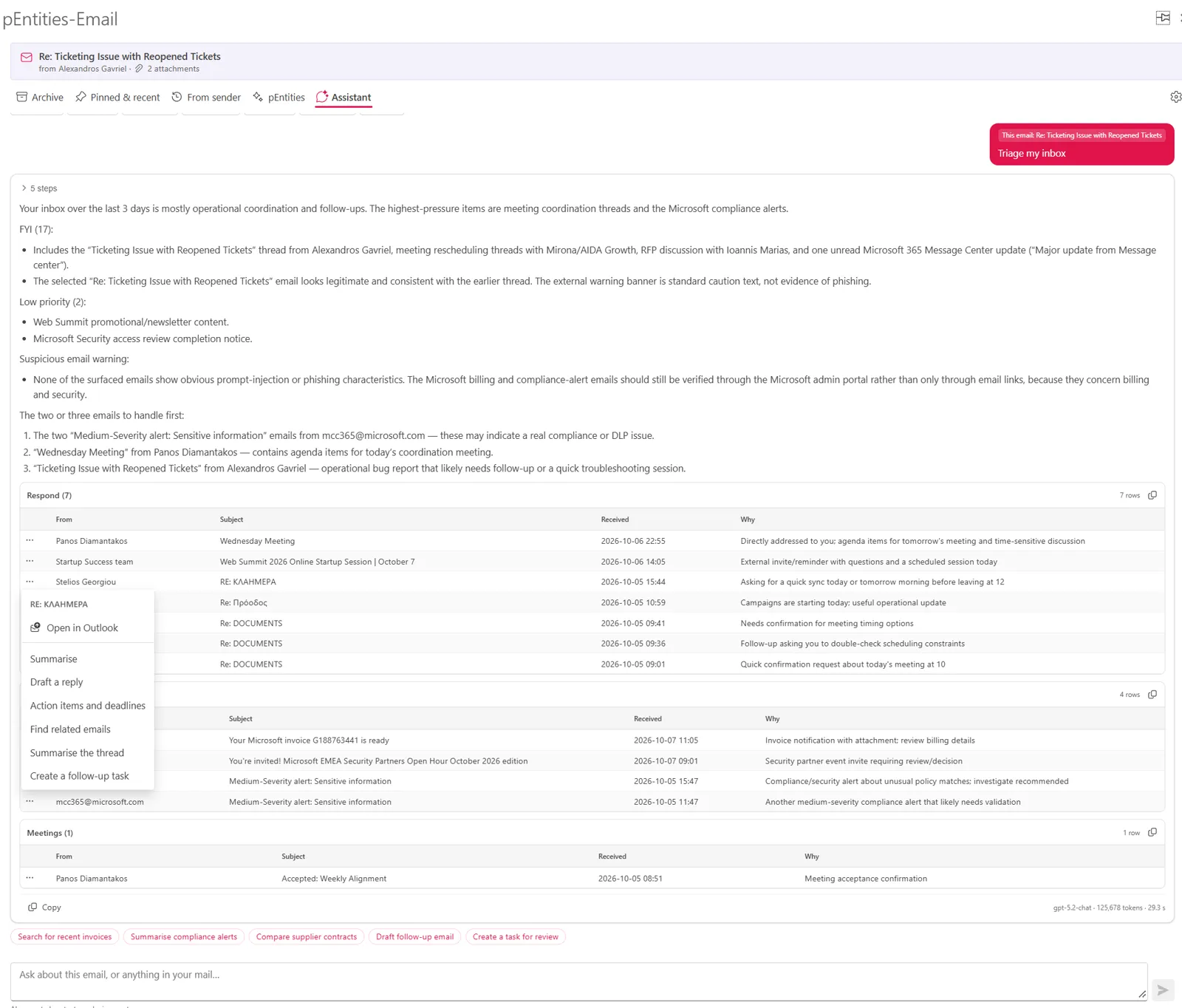
Ask in your own words. Summarise, draft a reply, find related threads, pull out action items, translate, propose a meeting or triage a shared mailbox.
The assistant knows the email you are reading and the record it belongs to. Every reply it drafts can be made shorter, more formal or friendlier - and before it sends, changes or deletes anything, it asks for your approval. Powerful, and always on a leash.
While you write: AI drafts, secure links and send checks
- Write with AI - say what the email should say, pick a tone (polite, formal, friendly, short), and let the AI draft it, even looking up facts in the record's documents.
- Secure links with PIN - share documents with a PIN sent separately, an expiry date and an Approve / Reject answer, then see who opened what and when.
- File after sending - tick once, and the sent email files itself to the record.
- Send checks - a missing attachment, one client's email about to reach another, or personal data heading outside the organisation is caught before you hit Send.
- Industry packs - Legal (matters, legal holds, time recording), Accounts payable (duplicate and PO checks), Shipping (vessels, IMO numbers, laycan) and HR recruitment (CV to candidate).
Two editions. One pane. Zero friction.
Install pEntities-Email from the Microsoft Marketplace and the free features work immediately for anyone with a Microsoft 365 work or school account. When your organisation runs pEntities Premium, the Premium features light up in the same pane - nothing to reinstall, nothing to relearn.
Free - no AI, no subscription
- Archive to OneDrive, SharePoint libraries and lists, and Teams
- PDF, .eml and Outlook .msg with attachments and column values
- Pinned & recent destinations
- Drag and drop emails and attachments
- Save whole Outlook folders - or their new emails automatically
- From sender history with full preview
- Find in Microsoft 365 - attach a copy or insert a link
- Share in Teams group chats
- Missing-attachment and personal-data send checks
Premium - connected, intelligent, automated
- Filing to pEntities records with suggestions and retention labels
- Record card, To file and earlier emails for a record
- AI summaries, AI tags and the email assistant
- Data extraction from invoices, receipts, contracts and IDs
- Tickets, the ticket card and shared-mailbox desks
- Email routing, automations and Save as a workflow
- Write with AI, commitments and secure links with answer
- pEntities Apps and industry packs (Legal, AP, Shipping, HR)
- Personal data reports for access and erasure requests
Try it today - it costs nothing. Use the free edition for as long as you like. When you want email connected to your clients, cases and projects, pEntities Premium is one Marketplace subscription away, and everything you already saved is right where you left it.
Your content is yours. It stays exactly where it already is.
Stays in your Microsoft 365
Saved emails are files in your own OneDrive, SharePoint and Teams, written through Microsoft Graph in your name. Nothing is copied to a third-party service.
Never widens access
You only see the sites, libraries and teams you can already open. Saved files inherit the destination's permissions - exactly as if you had uploaded them there.
AI on your terms
Free features use no AI. Premium AI runs in pEntities in your organisation's Azure environment, with your permissions, and reads only the email you ask about.
Nothing sent without you
Drafted replies open in Outlook for you to check. Any action that sends, changes or deletes asks for your approval first. Send checks run on your device.
Personal data, masked
IBANs, card, tax and ID numbers are detected, shown only masked, and never stored - helping you keep personal data where it belongs.
Admin-friendly
Permissions are requested only when a feature first needs them, and an administrator can grant consent once for the whole organisation.
Get pEntities-Email now
Install it free from the Microsoft Marketplace and save your first email to SharePoint in under a minute. Works in Outlook on the web, the new and classic Outlook for Windows, and Outlook for Mac.
Want the details first? Download the pEntities-Email support & user guide (PDF)
The Outlook front door to everything pEntities does
The records, desks, tickets, matters, workflows and AI agent that pEntities-Email works with live in the pEntities app in Microsoft Teams and its modules.
pEntities Platform
Every client, case, employee or project as a living workspace in Microsoft Teams - documents, emails, tasks, people and AI in one place.
Explore pEntities →Automation
The visual workflow engine behind Save as a workflow and email automations - designed in Teams, running in your tenant.
Explore Automation →Ticketing
The projects, SLAs and approval flows that tickets created from Outlook land in - tracked in real time.
Explore Ticketing →Legal
Matters, legal holds and time recording - the Legal pack in Outlook connects every email to its matter.
Explore Legal →Frequently asked questions
What is pEntities-Email?
pEntities-Email is an add-in for Microsoft Outlook that saves emails and their attachments to OneDrive, SharePoint and Microsoft Teams, and - with pEntities Premium - files them to the client, case or project record they belong to, with AI summaries, tickets and automation.
Is pEntities-Email free?
Yes. The free features - archiving, pinned and recent places, From sender, Share in Teams, Find in Microsoft 365, drag and drop and Outlook folders - work for everyone with a Microsoft 365 work or school account, with no time limit. Premium features come with pEntities Premium on the Microsoft Marketplace.
Does pEntities-Email keep a copy of my email?
No. Emails are saved as files in your own OneDrive, SharePoint or Teams through Microsoft Graph, in your name. The add-in holds no database of your email and nothing is copied to a third-party service.
Which versions of Outlook are supported?
pEntities-Email works in Outlook on the web, the new Outlook for Windows, classic Outlook for Windows (Microsoft 365) and Outlook for Mac.
Does the free edition use AI?
No. Free features use no AI. Premium AI features run in pEntities in your organisation’s Azure environment, with your permissions, and read only the email you ask about.