AI-Powered Chatbot Platform for Microsoft 365 Automation
Transform your Microsoft 365 experience with intelligent document management, email automation, SharePoint integration, and advanced AI capabilities. Automate tasks, analyze documents, and streamline workflows with natural language commands.
The Business Platform That Thinks With You
pEntities lives inside Microsoft Teams and turns every contract, case, employee or project into a living workspace documents, emails, tasks, people and AI in one place. Not another database. A digital partner for every team.
One complete picture. Everything attached to a record documents, correspondence, tasks and figures gathers itself into a single view. Nothing lost, nothing scattered across inboxes and folders.
Documents that fill in the forms. Invoices, receipts, identity documents and contracts are read the moment they arrive, and the data lands where it belongs in seconds rather than being retyped.
An expert for each department. AI agents for legal, HR, finance and logistics that know your own documents and data, and can find, draft, analyse and cross-check. Not a generic chatbot a colleague who knows the business.
Nothing new to buy or learn. It runs inside Microsoft Teams on the Microsoft 365 you already own, in your own tenant, with the sign-in your people already use and HR, legal, ticketing and finance all live on the same platform.
See the platform in action
Intelligent, compliant documents without moving a single file out of Microsoft 365
No new repository and no migration. Your files stay exactly where they are pEntities adds organisation, search, compliance and protection on top, inside the same Teams window your people already use.
Every document about a record, in one place
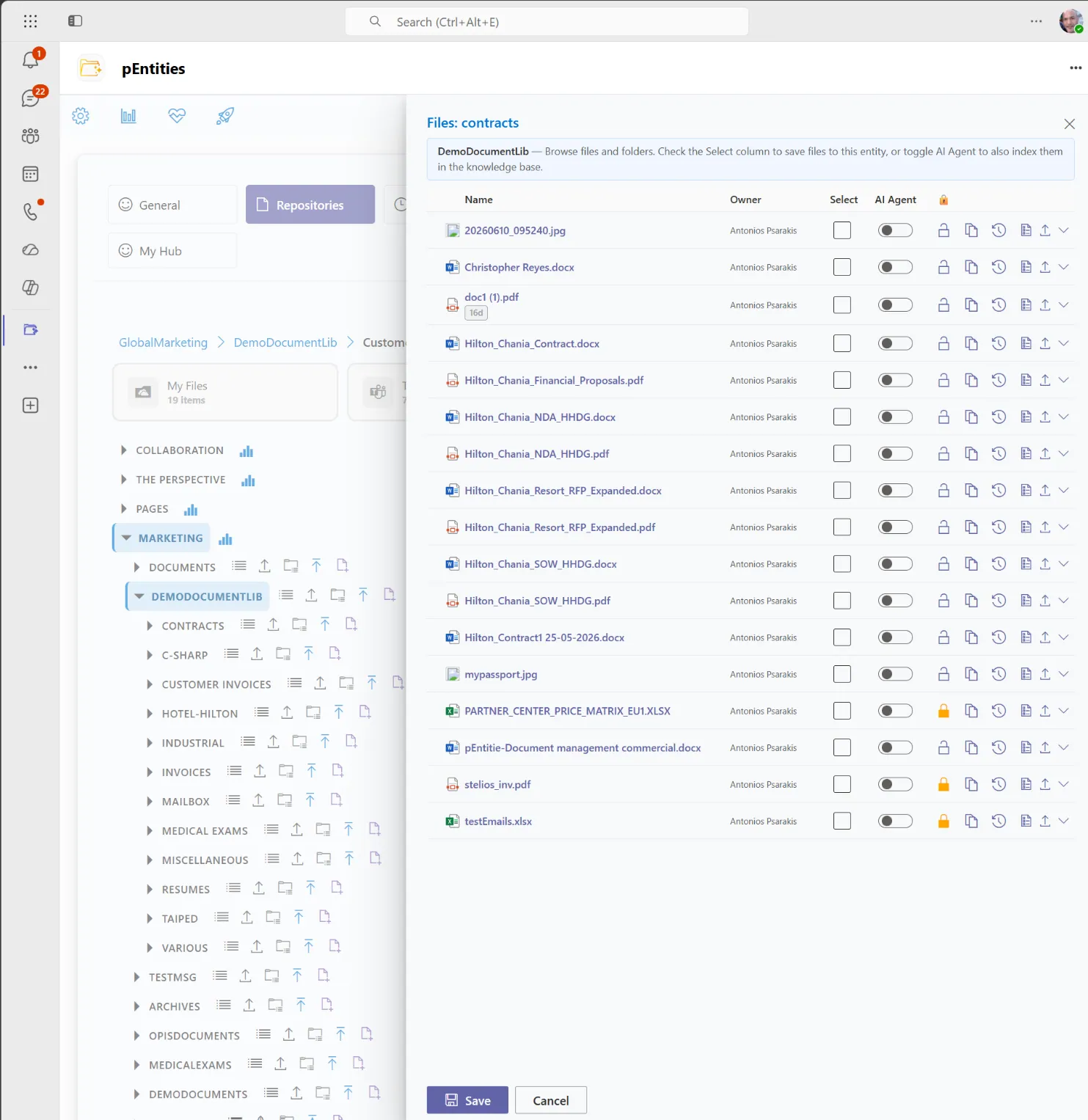
A brand, a project, an employee, a case each becomes one organised home that gathers the documents that matter, wherever they already sit. Nothing is copied or moved, so an edit made in Word or Excel is visible immediately and there is never a second version to reconcile.
Everything keeps the version history, the categories and the fields your organisation already uses, and two people can work on the same file without overwriting each other.
Find it in seconds, read it without downloading it
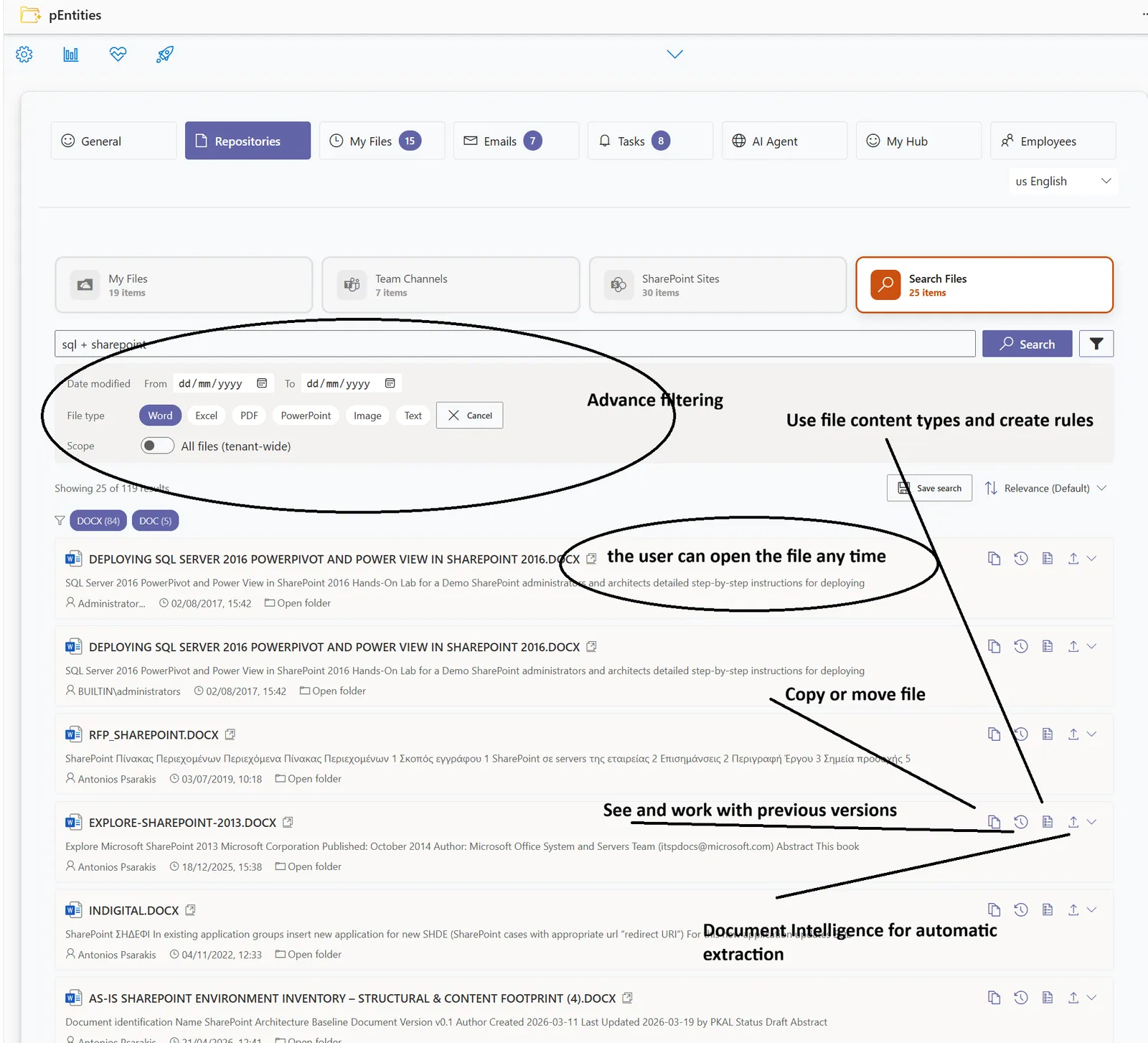
One search covers every document in the organisation and returns only what that person is allowed to see, with a preview, who last changed it and where it lives. Searches a team runs often can be saved and repeated in a click.
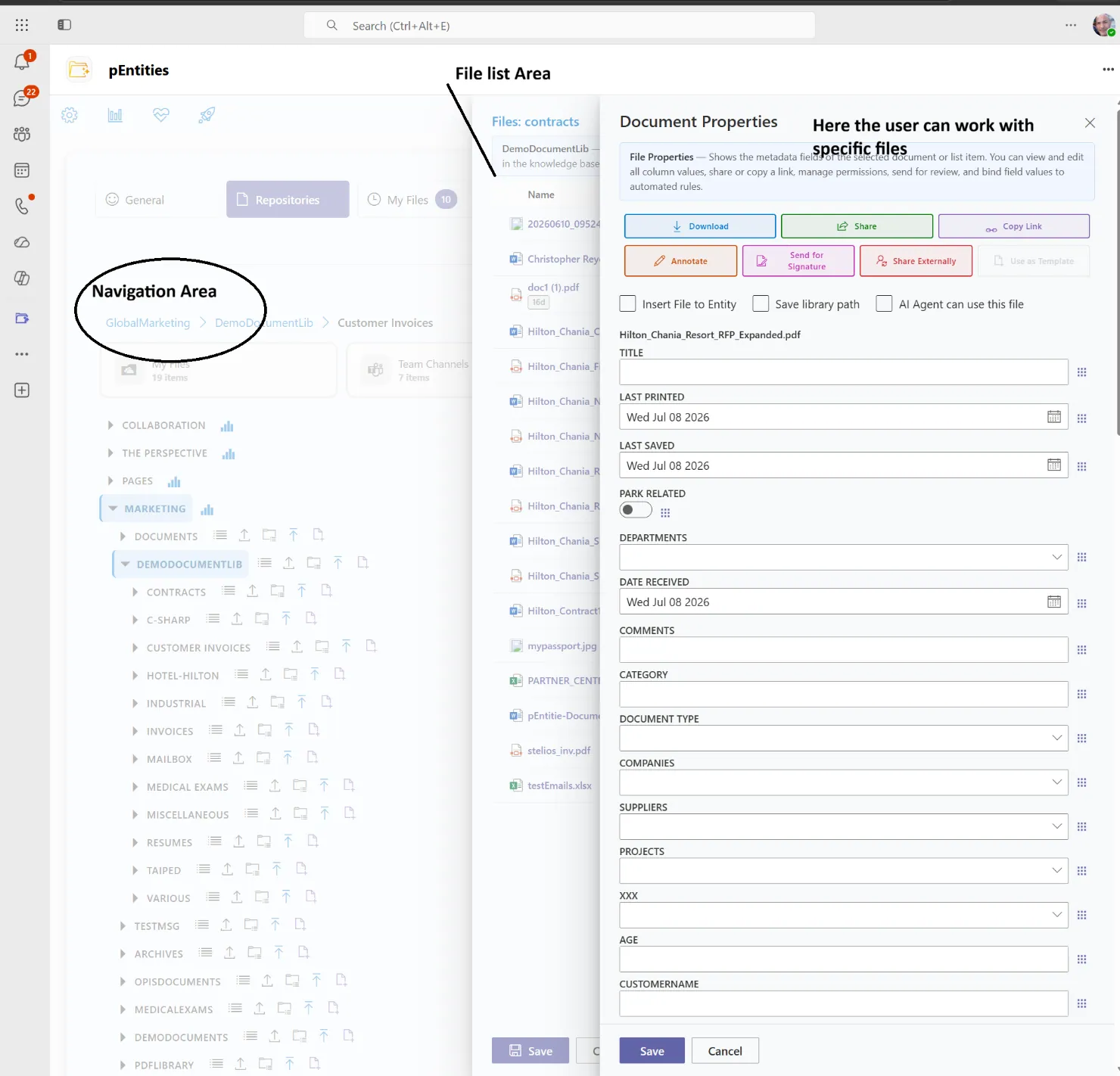
Word, Excel, PowerPoint and PDF open in full fidelity inside Teams, so people read in place and no loose copies leave the business.
Compliant by default, and provably so
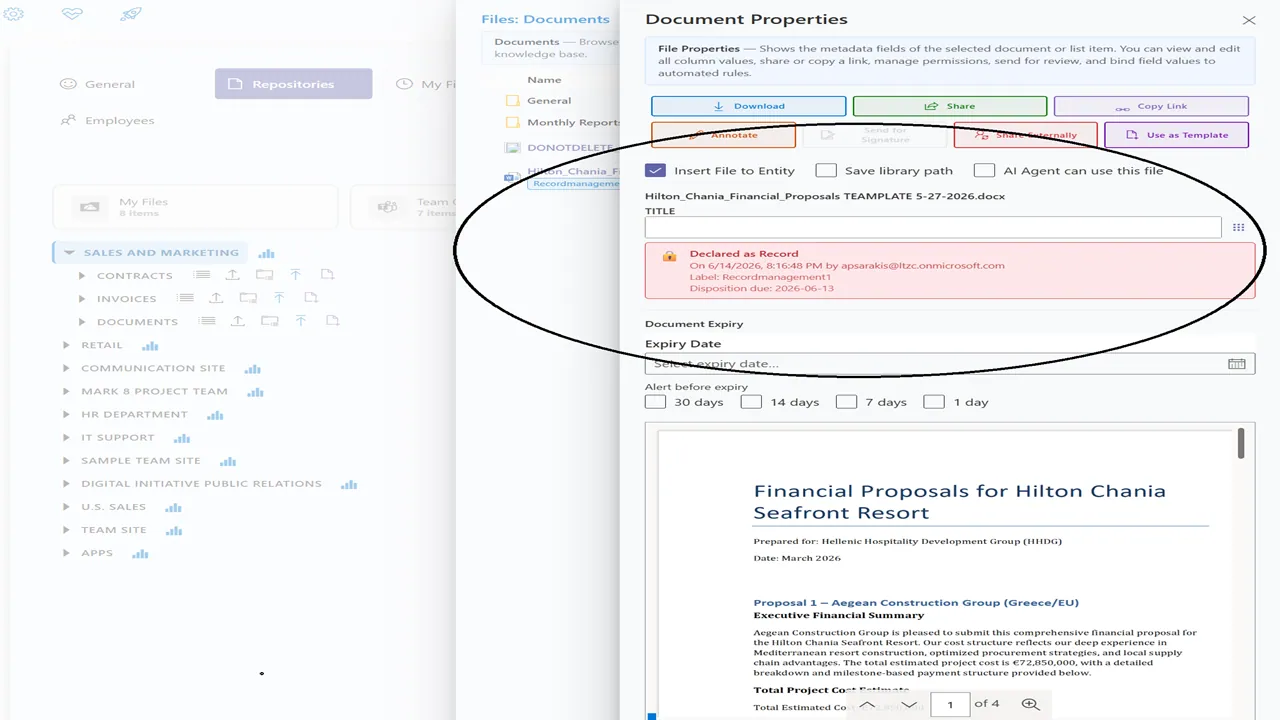
Retention rules, record declaration and expiry reminders are part of everyday handling rather than a separate exercise, using the same Microsoft governance that already protects the rest of your organisation. Every compliance event is logged with who, when and why.
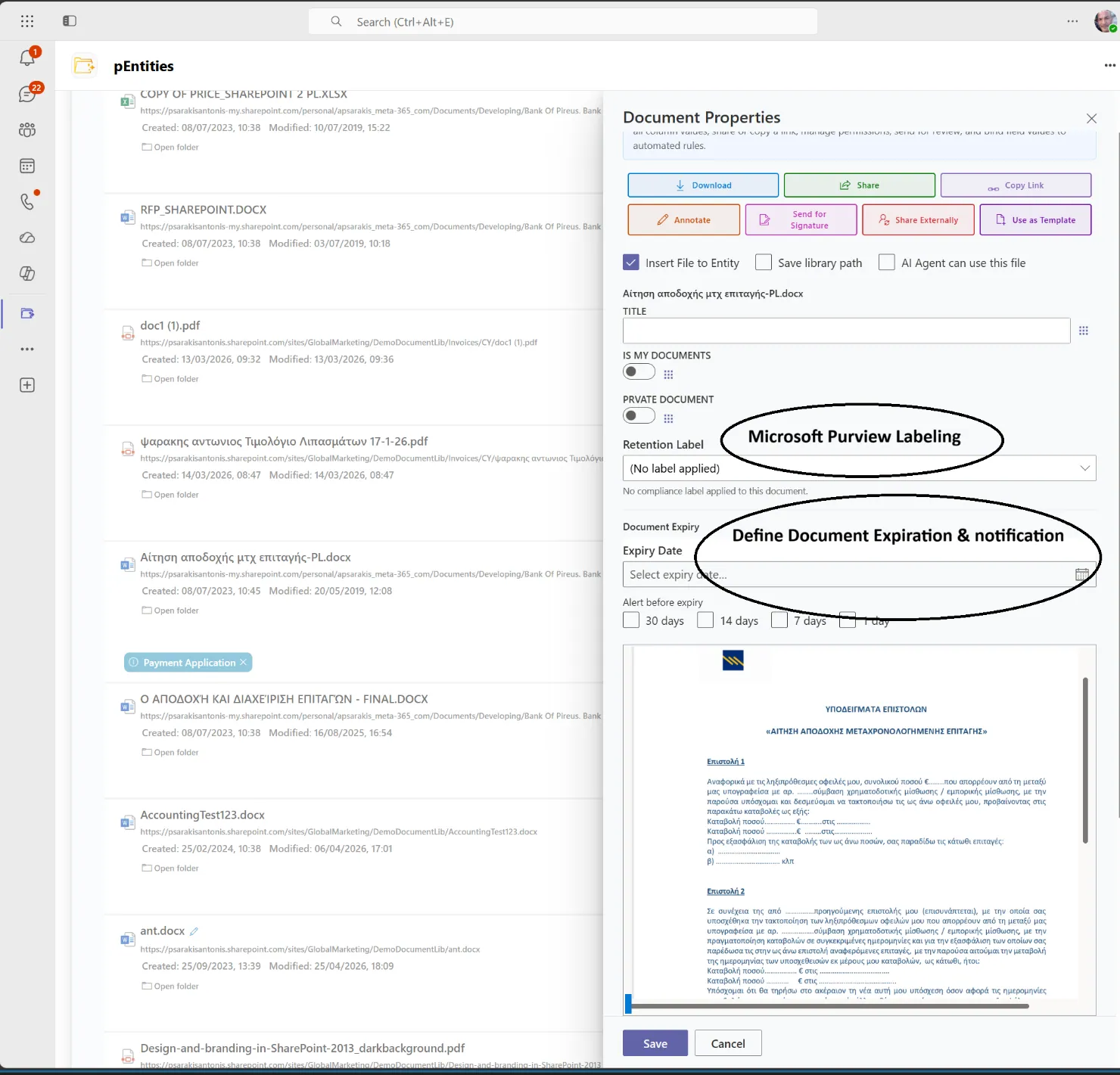
When a document does have to leave, it is watermarked with who took it and when, access follows the permissions you already have in place, and the download is recorded. Everything stays in your own tenant, encrypted, and nothing leaves the EU.
Describe the problem. Get a running process. Without leaving Microsoft 365.
The contract that should be reviewed before it renews. The joiner who needs six things to happen in order. The request that must reach the right team before its deadline. pEntities turns each one into a process that runs itself designed inside Teams, on your own data, in your own tenant.
Design it by drawing it
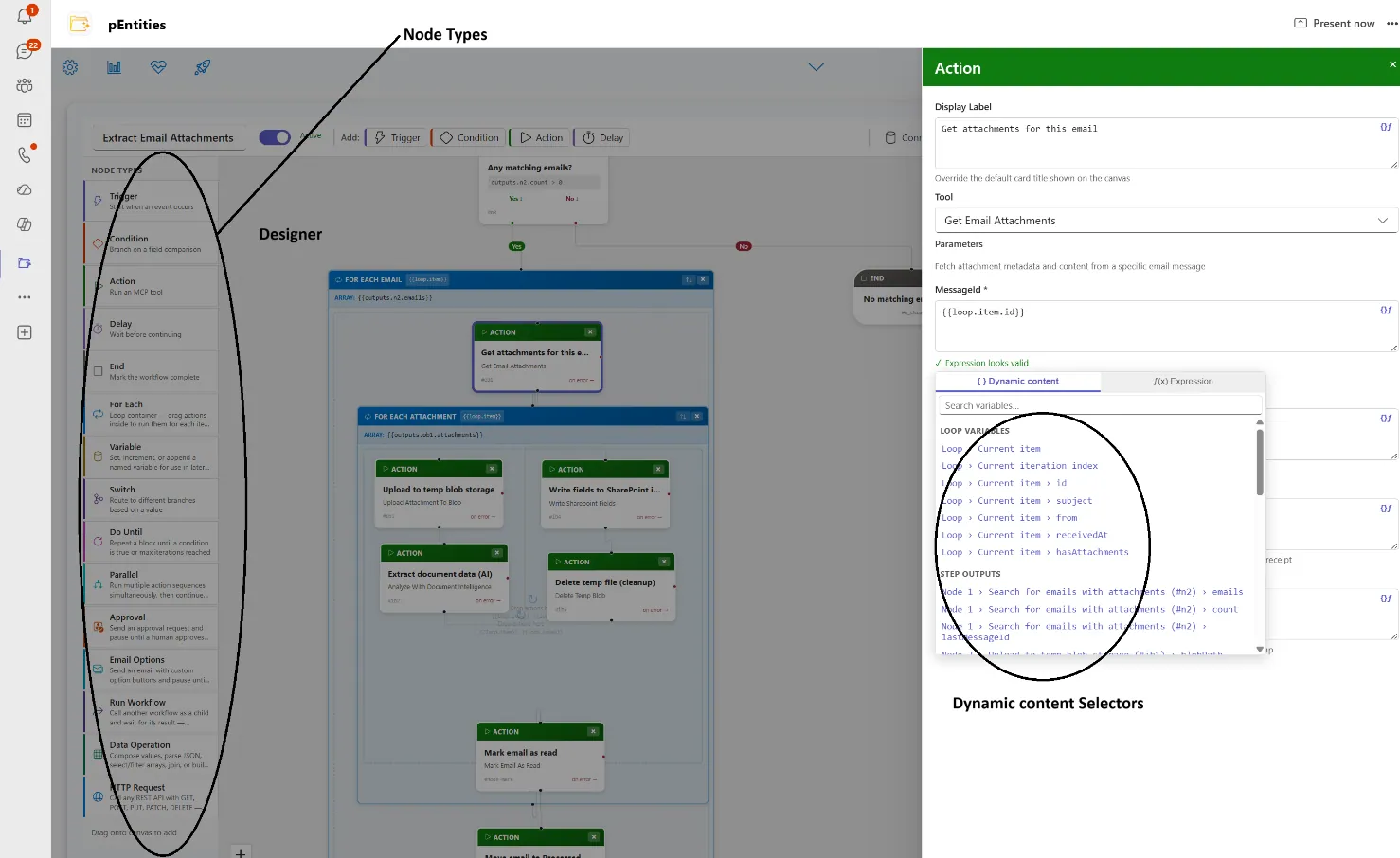
Processes are built by dragging steps onto a canvas and connecting them, in the same Teams window the work already happens in. The result is a diagram anyone in the room can read.
A process can start on a date, on a record or field changing, on a file arriving, on an email, or on a business event nearly forty in all and then do more than forty things in response: send and file correspondence, generate documents from templates, extract data from invoices and contracts, assign work, update records, or call one of your other systems.
It also waits the way real processes wait. An approval can sit for days or weeks, asked by email with your own buttons Renew, Renegotiate, Let it lapse and the process continues from the answer. No app, no login.
Checked before it goes live, accountable after
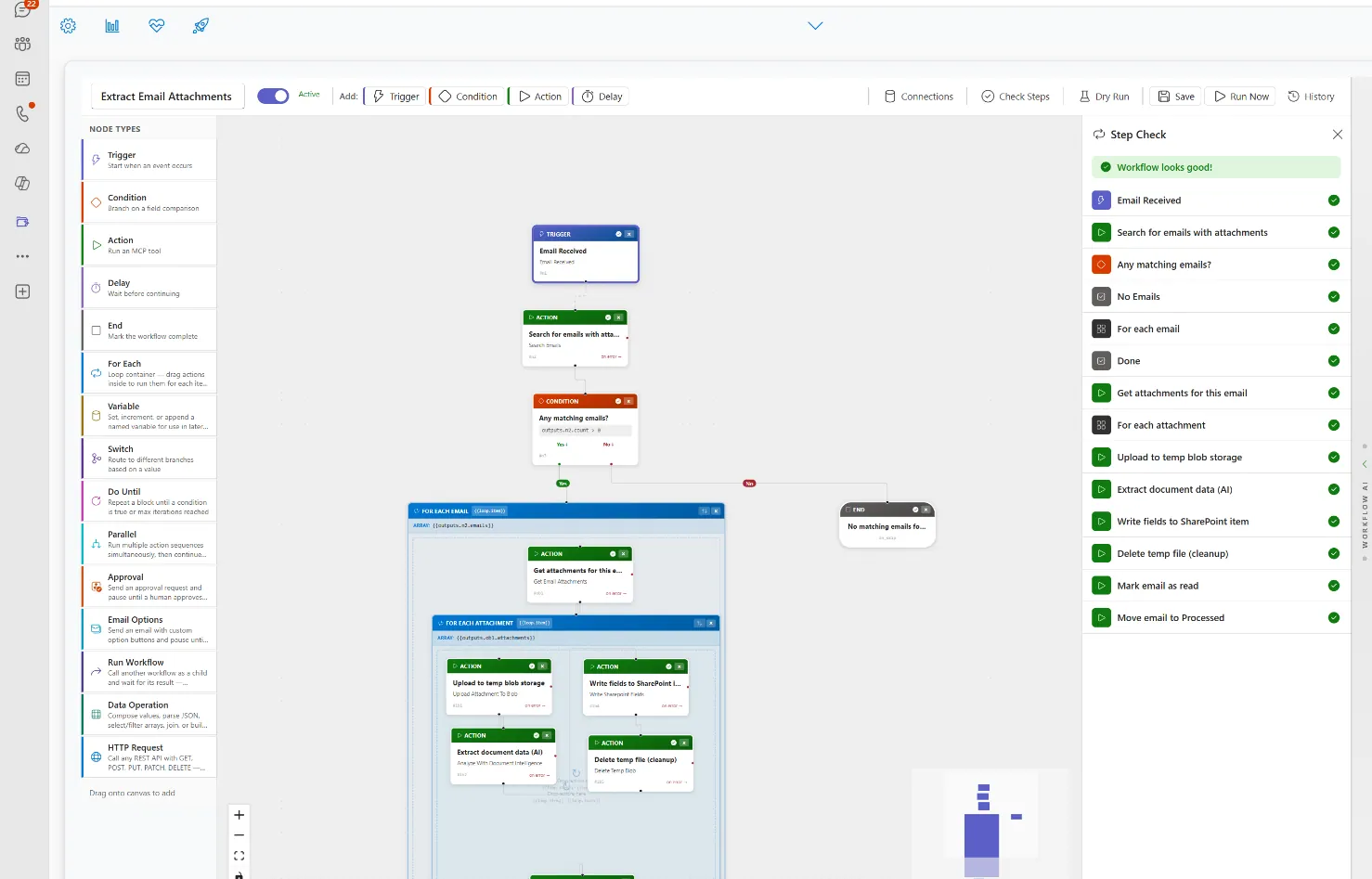
Before publication, pEntities checks the whole process and points out anything that would fail. You can then rehearse it on real data without affecting anything, and see exactly what each step would do and which path it would take.
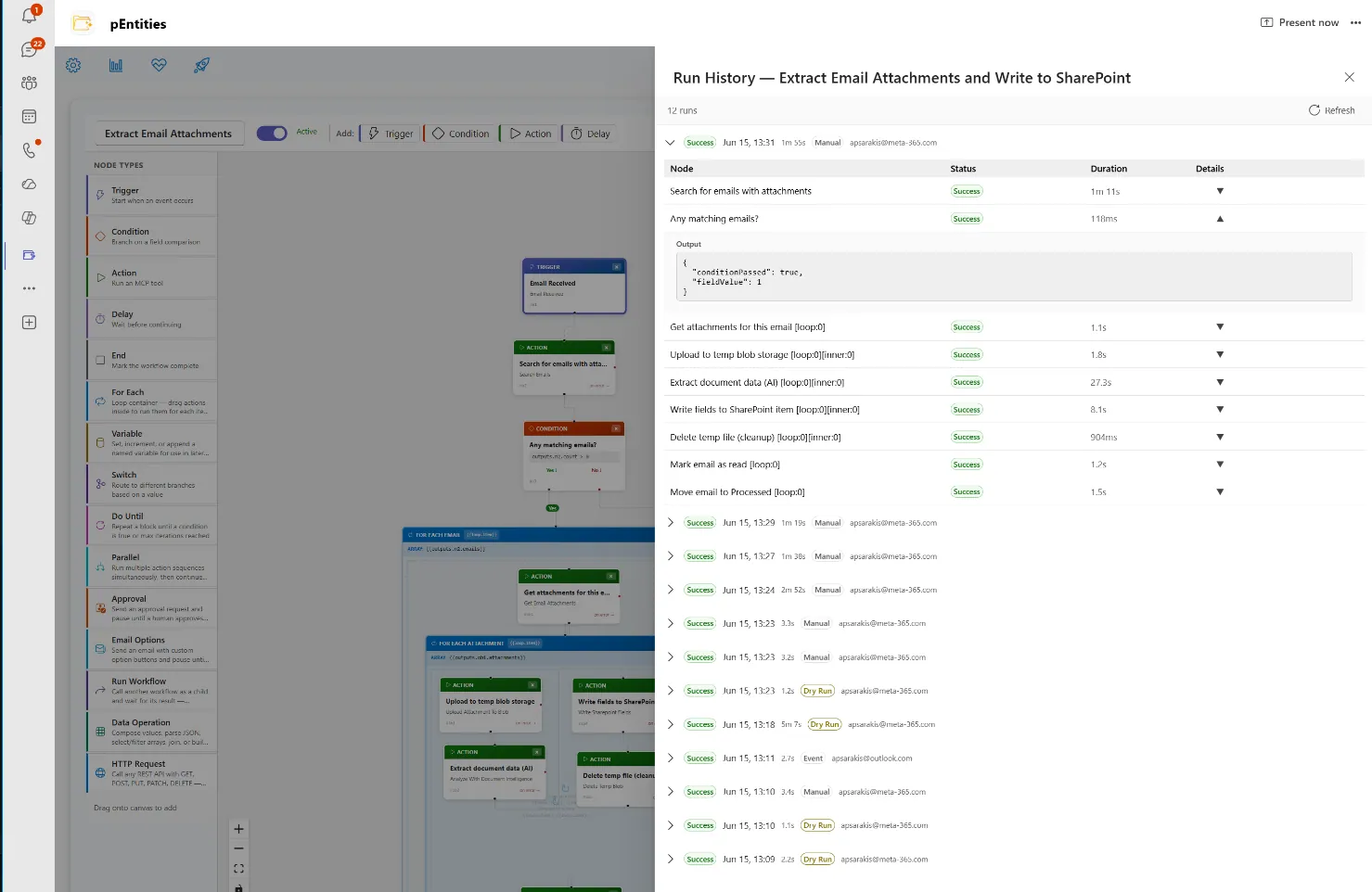
Once live, every run is listed step by step with its status, duration and any errors. Processes recover from interruptions on their own, safety limits stop a bad design running away, and everything workflows, history and logs stays inside your own tenant, running with the permissions of the person who owns it.
Describe the problem in a sentence. Get the workflows that fix it.
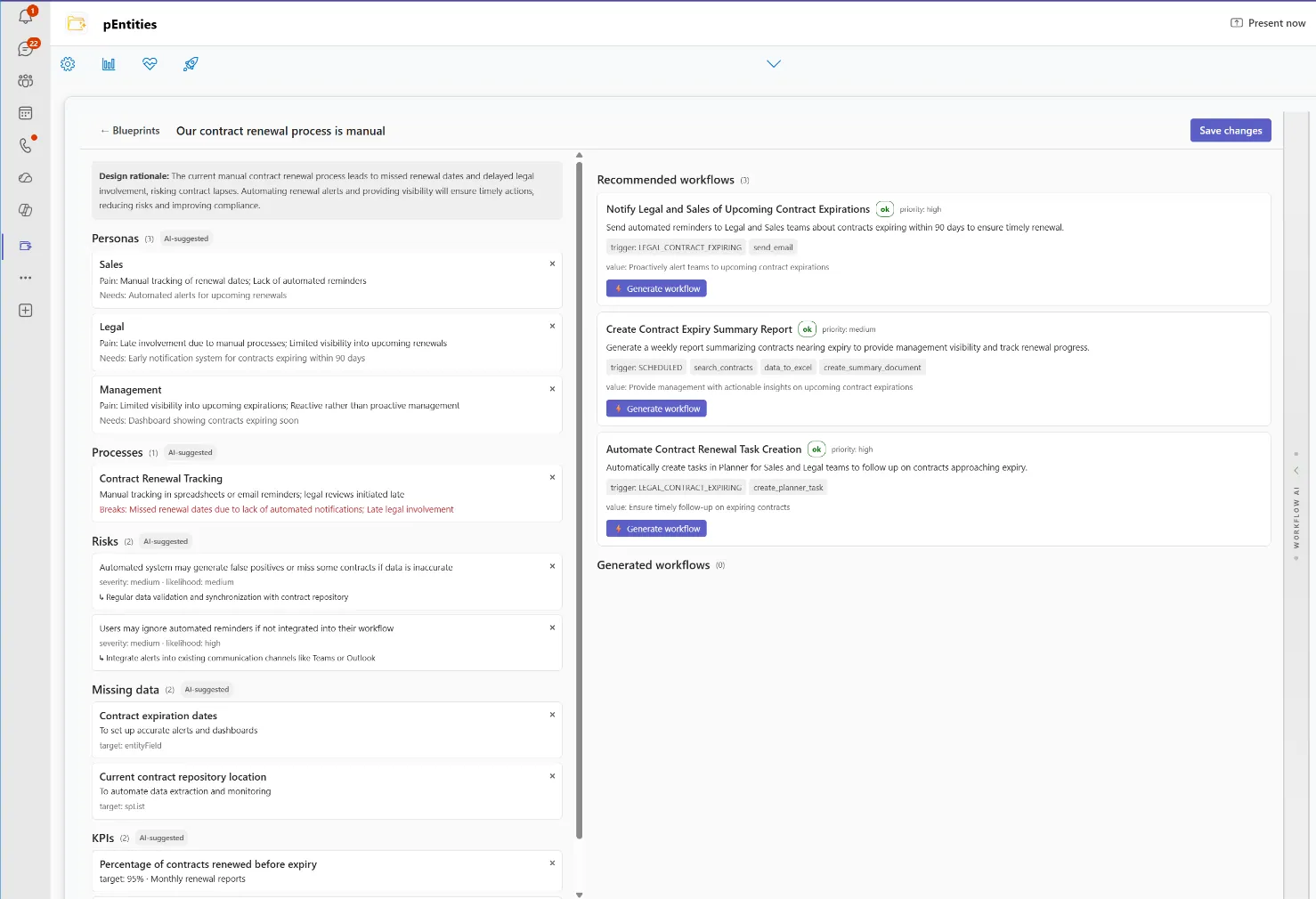
"Sales misses renewal dates and Legal is brought in too late."
That one sentence is the whole brief. Blueprint reads it the way an experienced consultant would who is involved, where the process breaks and what it is costing then prescribes concrete workflows and builds the ones you approve on the canvas, ready to review and put live. Nothing is left as a suggestion, and every recommendation is verified against what the platform can genuinely do before you see it.
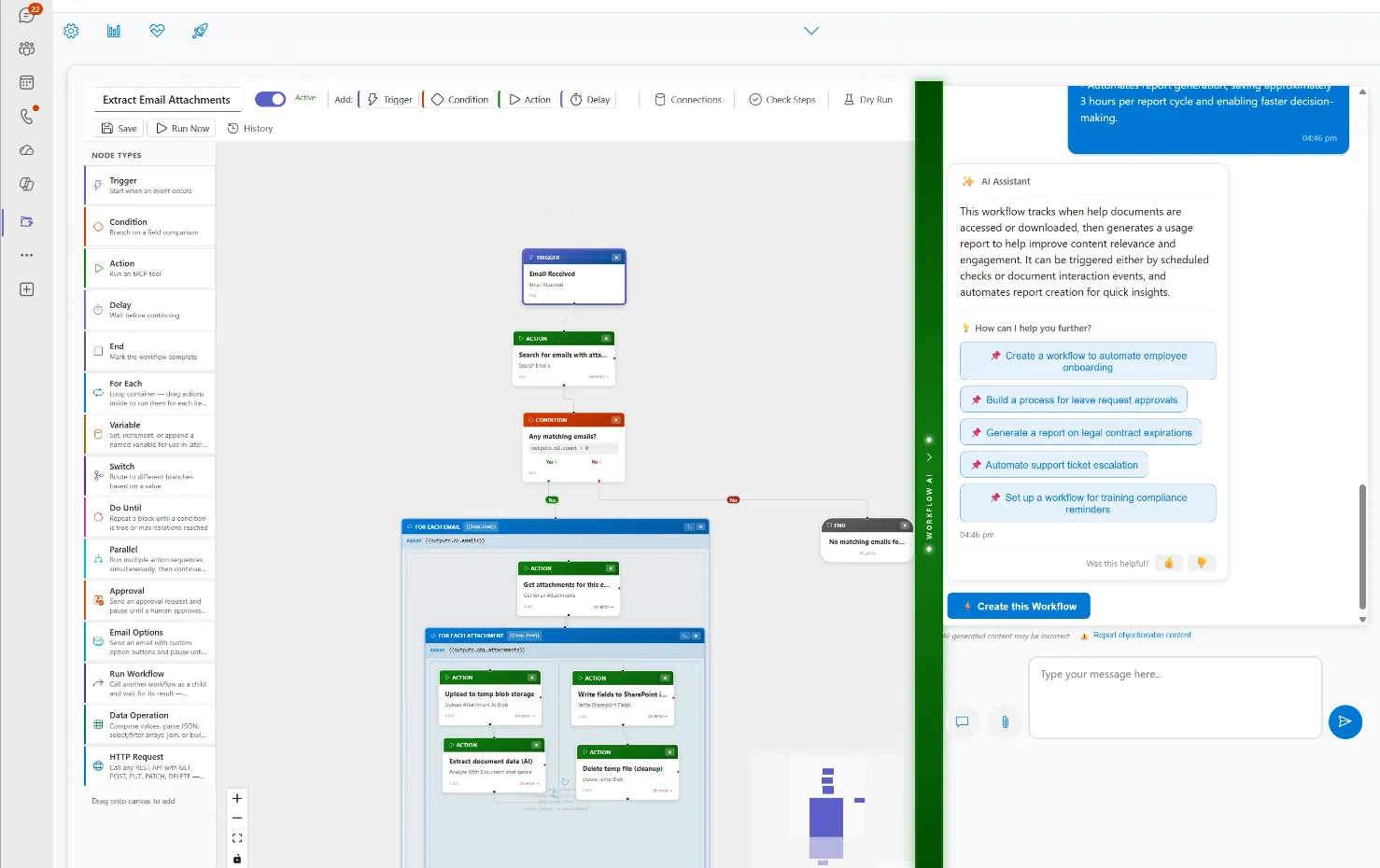
Day to day, the Workflow Advisor continues the same conversation beside the designer suggesting automations worth having, building the one you describe in a sentence, and answering questions as they come up.
pEntities Free
Organise everything you already own documents, tasks, mail and records inside Microsoft Teams, with no migration, no new infrastructure and no cloud bill. Installed by a Teams administrator in minutes, it uses only the Microsoft 365 licences you already pay for.
Entity workspaces
Every client, project, contract or case becomes one workspace that gathers its documents, emails, tasks and people. The files never move they stay in SharePoint, Teams and OneDrive exactly where they are.
Document management
Attach from anywhere, preview Word, Excel, PowerPoint and PDF in place, search the whole organisation, generate documents from templates, and see which other records use the same file.
Metadata & versions
Edit the real SharePoint fields from the record, compare any two versions side by side, check files in and out safely, and manage sharing and permissions without leaving Teams.
Tasks in Microsoft Planner
Tasks raised from a record are real Planner tasks, so they appear in Planner, To Do and Teams the same board your people already check every morning. Nothing is trapped inside pEntities.
Rules that react
Bind any field to a rule: when its value changes, raise a task, send an email or call a Power Automate flow you already have. Configured by pointing and clicking, with no developer involved.
Notes, retention & email
Meeting notes and call logs kept in OneNote against the record, emails and attachments filed with it, and your existing Microsoft retention labels and record declaration applied in place.
Free no Azure services
- Entity workspaces and content organisation
- Document linking, preview, upload and search
- SharePoint metadata, content types and taxonomy
- Version history, check-out, sharing and permissions
- Microsoft Planner tasks and checklists
- Field rules tasks, email and Power Automate
- Retention labels and record declaration
- Outlook email and attachment filing
Premium adds the intelligence
- AI knowledge base and document chat
- Data extraction from invoices, contracts and IDs
- Meaning-based search across the whole estate
- Understanding of scanned documents and images
- The visual workflow engine and Blueprint
- Guest portal for external review and approval
- HR, Legal and Finance modules
- Electronic signature integration
Organisation is the problem most teams actually need solved. Content that is findable, attached to the right record, correctly labelled and connected to a task list is content a team can work with. Use the free edition for as long as you like, then decide on evidence rather than on a promise whether the AI capabilities are worth adding. Nothing has to be rebuilt when you do.
Watch our product presentation to see how pEntities revolutionizes Microsoft 365 automation
In a few minutes you'll see how a contract, a case or an employee record becomes a living workspace documents, emails, tasks and AI working together inside Microsoft Teams.
Watch documents read themselves with Document Intelligence, AI agents draft and analyse in context, and no-code workflows route approvals and enforce deadlines on their own.
Everything shown is live in the product today, running entirely inside your own Microsoft 365 and Azure tenant no migration, no new logins, and no data leaving your control.
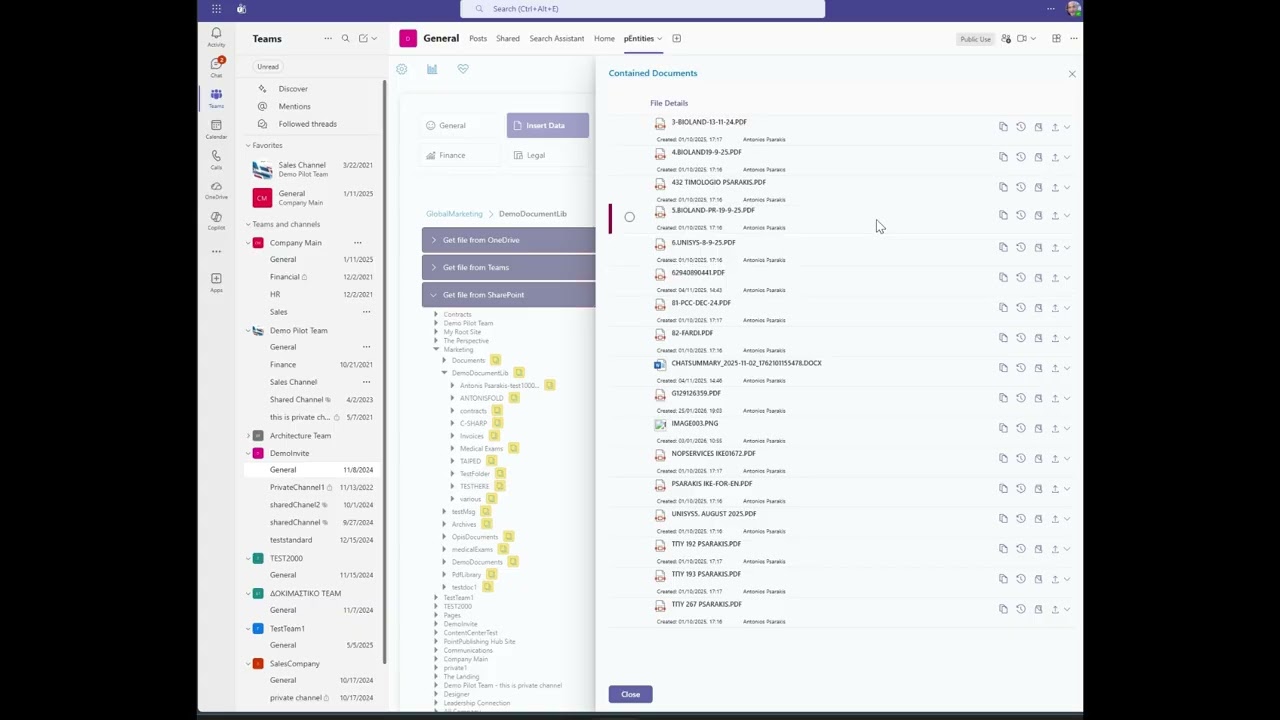
Click to watch the full presentation
Get pEntities Now
Download pEntities directly from Microsoft AppSource and revolutionize your Microsoft 365 automation
Purpose-built modules for the work your teams actually do
One platform, four specialised modules each with its own domain AI agent, all running inside Microsoft Teams on the data you already own.
HR Module
The full employee lifecycle onboarding with automatic task lists, leave with multi-level approval, performance reviews, training tracked to its expiry date and payroll analysis. The HR agent spots compliance risks and writes the reports for you.
Explore HR →Legal Module
Every case tracked from pre-trial to appeal court, lawyers, opponents, confidentiality level, financial exposure and risk. Contracts carry milestones, auto-renewal detection and signature history, while the agent analyses timelines and exposure scenarios.
Explore Legal →Ticketing Module
Every request handled with precision IT, HR, finance or legal. Real-time tracking, automatic notifications, approval flows and full history, with priorities, SLAs and automation rules that work without anyone intervening.
Explore Ticketing →Finance Module
Invoices, expenses, purchases, budgets, receivables and tax data organised by fiscal year. Every figure links back to its original email, document and approval task full traceability, and an agent that spots trends and deviations.
Explore Finance →Frequently asked questions
Does my data leave my Microsoft 365 tenant?
No. Meta-365 runs as a managed application inside your own Microsoft 365 tenant, so documents, emails and records stay in your existing SharePoint, Outlook and Planner. There is no migration to a vendor cloud and no new data silo to security-review.
What is pEntities?
pEntities is a unified business platform that runs inside Microsoft 365, combining document management, HR, legal, finance, ticketing and a no-code workflow designer in a single application rather than six separate tools.
Do users need to learn a new system?
No. pEntities is delivered through Microsoft Teams, SharePoint and Outlook, so staff work in the applications they already use every day. There is no separate portal to log into and no retraining programme.
How is pEntities licensed?
pEntities is licensed per tenant rather than per user, with usage-based components. A free tier is available, and the platform is transactable through Microsoft AppSource and Azure Marketplace, so spend can draw down an existing Microsoft commitment.