Find anything across Microsoft 365 and act on it without leaving search
Search Assistant brings custom refinement filters to large libraries and unifies search across SharePoint, OneDrive, emails, Teams chats and contacts with in-place preview, metadata editing, sharing and version control, all from one interface.
Intelligent search that adapts to your content and your workflow
Searching vast amounts of content is hard you often need to filter by specific fields or hunt across scattered metadata. Search Assistant lets you define custom refinement filters, which makes it especially powerful in large-volume libraries.
Preview everything. Continuous document preview means you can always open and review the content you care about, without leaving the results.
Work across sources. Select multiple lists or libraries at once, and search everything from SharePoint documents to emails, chat messages and contacts all from one unified interface with intelligent filtering and metadata management.
Comprehensive search and content management, in one place
Filter precisely, preview in place, and manage metadata, permissions and versions right from your results.
1 · Custom refinement filters
Define custom refinement filters on metadata fields lookups, choice fields and managed metadata. Each field automatically loads all of its possible values for quick, precise filtering.
2 · Multi-source search
Search across SharePoint sites, document libraries, lists, emails, Teams chat messages and personal contacts all from a single unified interface.
3 · Continuous document preview
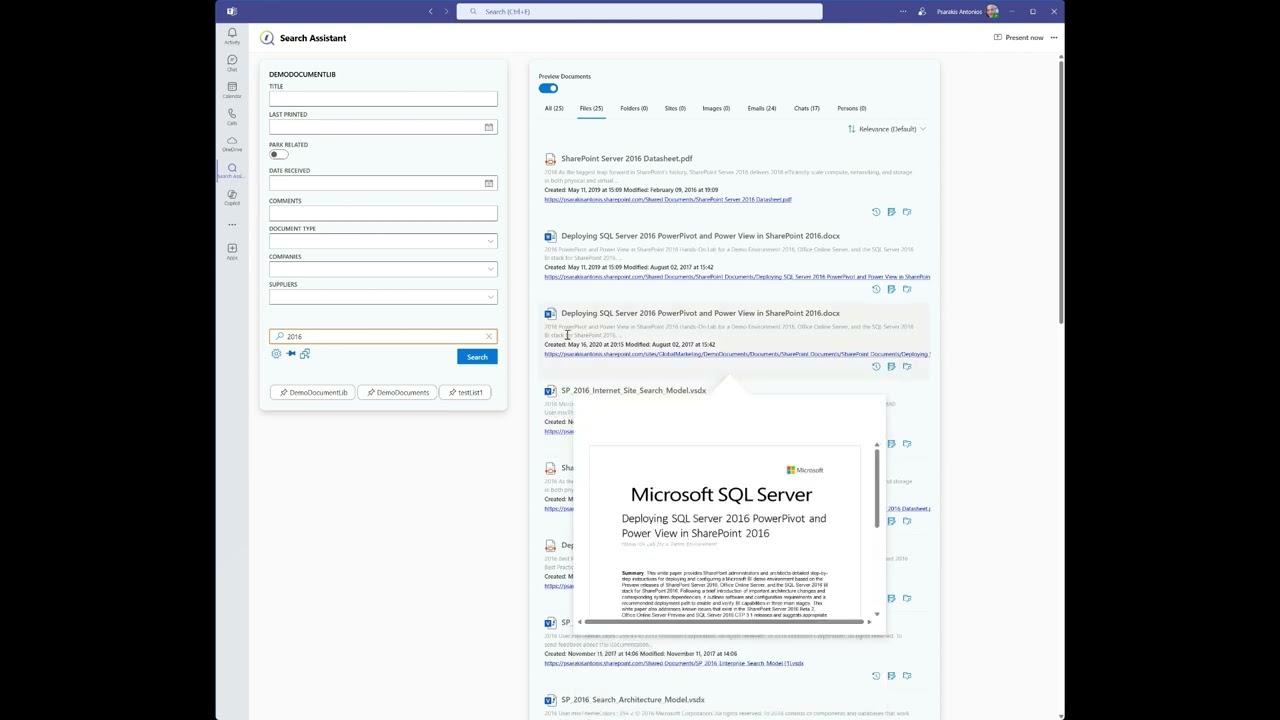
Access and review content with built-in preview. View documents without leaving search and work with them directly in the preview panel.
4 · Metadata management
Edit metadata straight from the results person fields, managed metadata, sensitivity labels and every other property without navigating to the source library.
5 · Permissions & sharing
Change permissions and share documents or list items with others directly from the search interface, streamlining collaboration without switching contexts.
6 · Version history
View and restore previous versions of documents and list items, see exactly what changed in each, and work with historical content seamlessly.
Intelligent search across every kind of content
One search, with the right actions for each result type across eight dedicated views.
All content
Files, list items, folders, sites and image names in one unified view across your whole Microsoft 365 environment.
Files
Filter to just files and enable a live preview to read and work with documents without leaving the interface.
Folders
Every folder matching your search, with one-click navigation to the structures across your organisation.
Sites
Discover SharePoint sites matching your terms and jump straight to them no browsing the whole collection.
Images
Preview images inline and navigate to their source locations ideal for managing visual content.
Emails
Search your email messages and navigate directly to them find communications without switching to Outlook.
Chat messages
Search Teams chat messages and open the conversation surface key discussions and decisions fast.
People
Find persons or groups across your organisation by name, department or other attributes.
Up and running in three simple steps
Configured once by someone with app-install permissions, then ready for everyone and reconfigurable anytime from the settings panel, with a one-click "return to default".
1 · Select the list
Choose the list or library from the Team where the app is installed. You can change the main list or library later, even from a different site. The initial configuration is set by personnel with app-installation permissions.
2 · Choose search fields
Select the fields to search and refine on. Each automatically loads all its possible values lookup, choice or managed metadata enabling powerful filtering tailored to your content.
3 · Define editable fields
Select which fields can be edited from the results (or choose "Select All") for complete control over what metadata can be modified directly from the search interface.
Everything it supports and the suite it belongs to
Supported environments
Search across
Core features
- Change permissions and data access
- Insert, update and change items & metadata
- People pickers and Term Sets supported
- Work directly with files and list items
- Navigate to original location, mail or chat message
- See and use previous versions
- Retain existing permissions & sensitivity labels
- Navigate inside document-library folders
- Download files and create shareable links
- Pin different lists
- Persist configuration across environments
Watch how Search Assistant transforms content discovery
In a few minutes you'll see custom refinement filters cut through a large library, a document previewed in place, metadata edited from the results, and a single search reaching across SharePoint, email and Teams chat.
Everything shown runs inside your own Microsoft 365 tenant, using the permissions your people already have.
Click to watch the full presentation
Get Search Assistant Now
Download Search Assistant directly from Microsoft AppSource and revolutionize your content discovery.

Part of the Meta‑365 suite
Search Assistant works alongside the rest of the Meta‑365 platform each product native to Microsoft 365 and built on the data you already own.
pEntities Platform
Contracts, cases, HR records and projects become living workspaces inside Microsoft Teams. Every record carries its documents, emails, tasks and approvals in one place, with a domain AI agent that reads the data you already own and surfaces the risks and next steps that matter.
Explore →DocSearch
Unified search and content management across OneDrive, SharePoint and Teams. Find any file, email or list item by content, metadata or type from a single box no matter where it lives and organise, preview and act on results without ever leaving Microsoft 365.
Explore →PShareEmail
Save Outlook emails straight to SharePoint, OneDrive or Teams and share them to the right channels in a couple of clicks. Attachments, metadata and conversation context are preserved, so important correspondence lands where your team can actually find and reuse it.
Explore →Workflow Automation
No-code workflows that trigger on your own data and run themselves. Build multi-step approvals, notifications and scheduled routines that react to changes across the suite automating the repetitive work your teams do every day without writing a single line of code.
Explore →