Command Every Matter.
Enforce Every Deadline.
Matters aren't lost because nobody cares! They're lost because the deadline lived in one calendar, the contract in a folder, the email in an inbox, and nothing connected them. Now they're connected, and the dates watch themselves.
Every matter, contract and deadline in one place
Legal teams don't lose matters because nobody cares. They lose them because the deadline lived in one person's calendar, the contract lived in a folder, the email lived in an inbox and nothing connected them.
One record, inside Teams. pEntities Legal brings the whole picture together: matters and their contracts, the risks and compliance obligations attached to them, the documents and emails that evidence them, the tasks that move them forward, and the dates that must not be missed.
Not another silo. Documents stay in SharePoint, email stays in Outlook, tasks are real Microsoft Planner tasks, and the whole thing runs inside your own tenant. What pEntities adds is the legal structure on top and an engine that watches the dates and acts on them without being asked.
The bottom line. A complete matter and contract register on the Microsoft 365 you already own. Deadlines chasing themselves, exposure visible across the portfolio, and no new platform to license, migrate to or secure. Available in seven languages.
Matters, contracts, obligations and the deadlines that govern them
A full case register with the commercial substance, the evidence and the dates attached and an engine that starts work when a date approaches.
1 · One home for every matter
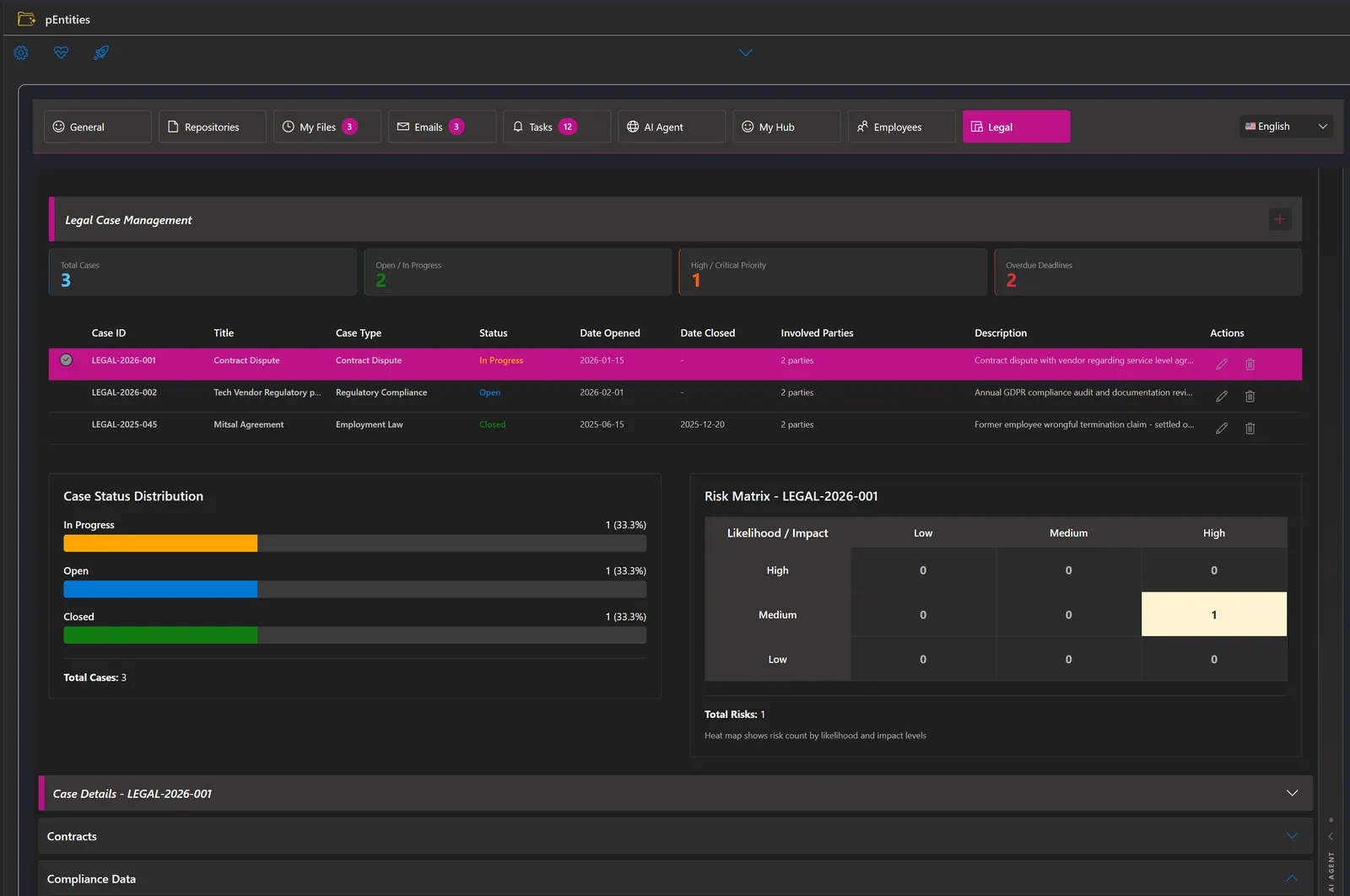
A matter is a single structured record not a folder name and a shared mailbox.
- Classified the way legal teams think type (dispute, litigation, employment, IP, patent, regulatory, corporate), category, sub-type, jurisdiction and priority from Low to Critical.
- The lifecycle, tracked pre-litigation, pleadings, discovery, trial, post-trial, appeal, settlement and archived.
- Who and where parties, assigned lawyer, wider team, external counsel, court name and case number.
- The dates that matter opened, closed, next hearing and next action deadline, each feeding the reminder engine.
- Classification and holds confidentiality up to attorney-client privileged, legal hold, tags and linked matters.
2 · Contracts. The full lifecycle
Contracts sit against the matter they belong to, with the terms and dates that decide what happens next.
- Every contract type service agreements, POs, NDAs, employment, licence and partnership agreements, each moving through active, expired, terminated or pending.
- The commercial substance parties, value, payment terms, governing law, signatories, execution date and termination reason.
- The dates that decide start, end and the renewal notice date, plus an auto-renew flag: the difference between a contract that lapses and one that rolls on is explicit, not assumed.
- Milestones a per-contract schedule for obligations falling due during the term, not just at the end.
- Linked to the evidence documents, emails, tasks, risks and compliance records attach to the contract itself.
3 · Deadlines that chase themselves
This is the part that pays for itself. pEntities watches the legal calendar hourly and starts a process when a date approaches no report to run, no one to remember.
- Six legal events a hearing approaching, a contract expiring, a renewal notice falling due, a compliance review due, a milestone due, a matter updated each can start a workflow.
- Tuned to the team per-trigger notice periods (hearings 7 days, compliance 14, expiry and renewal 30), filterable by case or contract type.
- It knows what auto-renews renewal reminders skip contracts already set to auto-renew, so the alert means something.
- Once a day, not once an hour the engine checks hourly but remembers what it raised, so one alert per event per day.
- Then it acts email the parties, raise a Planner task, write to SharePoint, request an approval and wait for the answer.
4 · Risk & compliance, on the record
Tracked against the matter and contract they belong to, not in a separate spreadsheet.
- Risk assessments likelihood and impact per risk, with the portfolio plotted on a matrix colour-graded by concentration, so it's visible rather than asserted.
- Compliance obligations regulations tracked per matter with review and due dates; a review coming due starts a workflow.
- Notes a running rich-text record kept with the matter.
5 · Documents, emails & tasks where they already live
No proprietary vault. pEntities links the evidence in place, from the Microsoft 365 you already run.
- Documents stay in SharePoint attached to a matter or contract and worked with in place, with version history, Purview retention labels and optional AI indexing.
- Email stays in Outlook attach the messages that evidence a matter and read them without leaving the record.
- Tasks are real Planner tasks with owner, dates, priority and progress, landing in that person's ordinary task list; completion tracks back to the matter.
The shape of the whole book and the process that runs itself
Exposure across the portfolio, an assistant that briefs you from the live record, and no-code automation driven by the legal calendar.
6 · Exposure & portfolio reporting
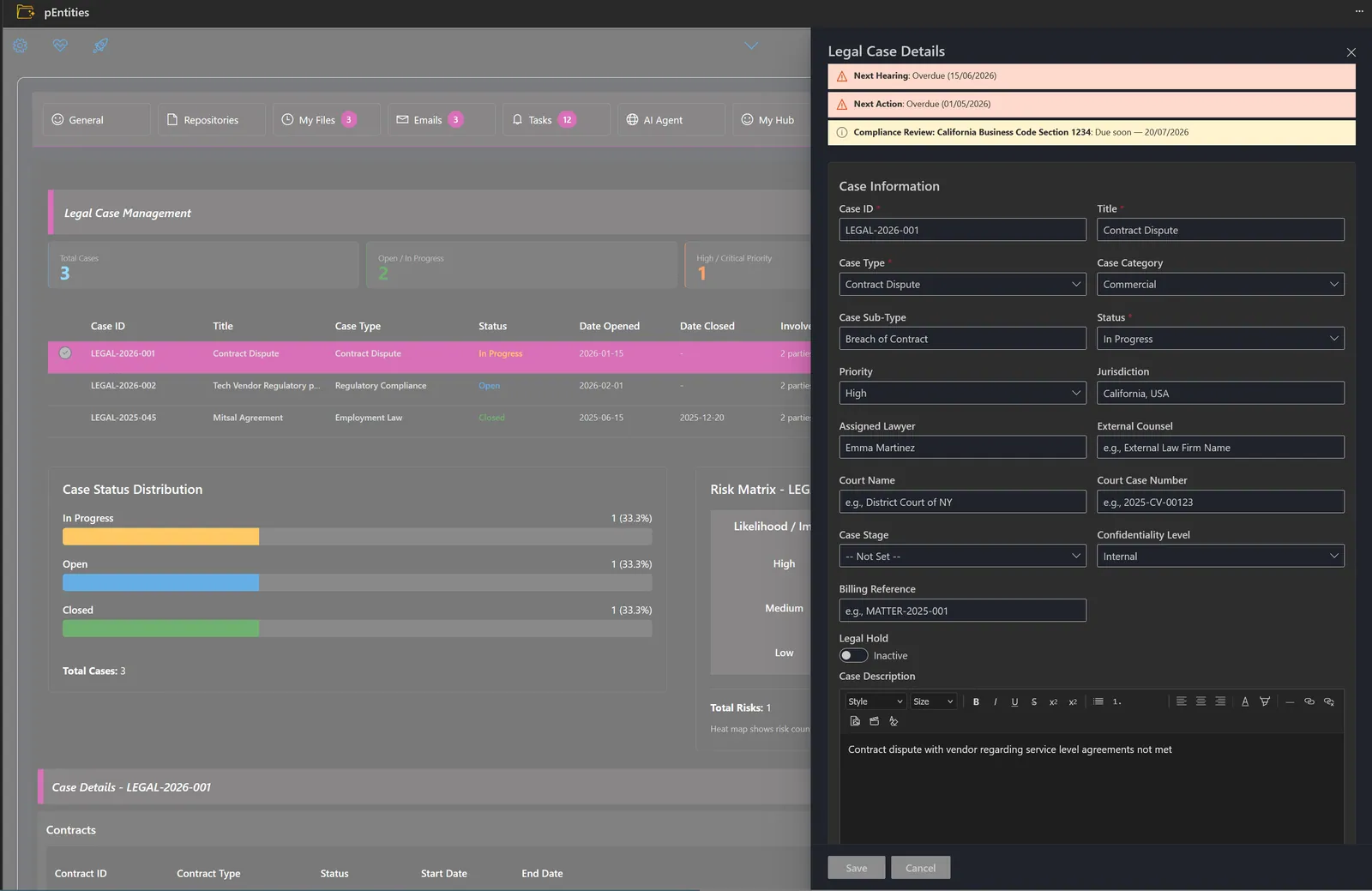
Legal leadership needs the shape of the whole book, not one matter at a time.
- The financial picture estimated exposure, settlements and fees per matter, rolled up across the portfolio and broken down by type, jurisdiction, status, lawyer or priority.
- Where risk concentrates the highest-exposure matters surfaced directly, so attention goes where the money is.
- How good the estimates were for closed matters, settled versus estimated: an honest measure of how well the team forecasts its own exposure.
- A single chronology per matter every dated event assembled into one ordered view, flagging what's coming and what's overdue.
7 · The AI legal assistant
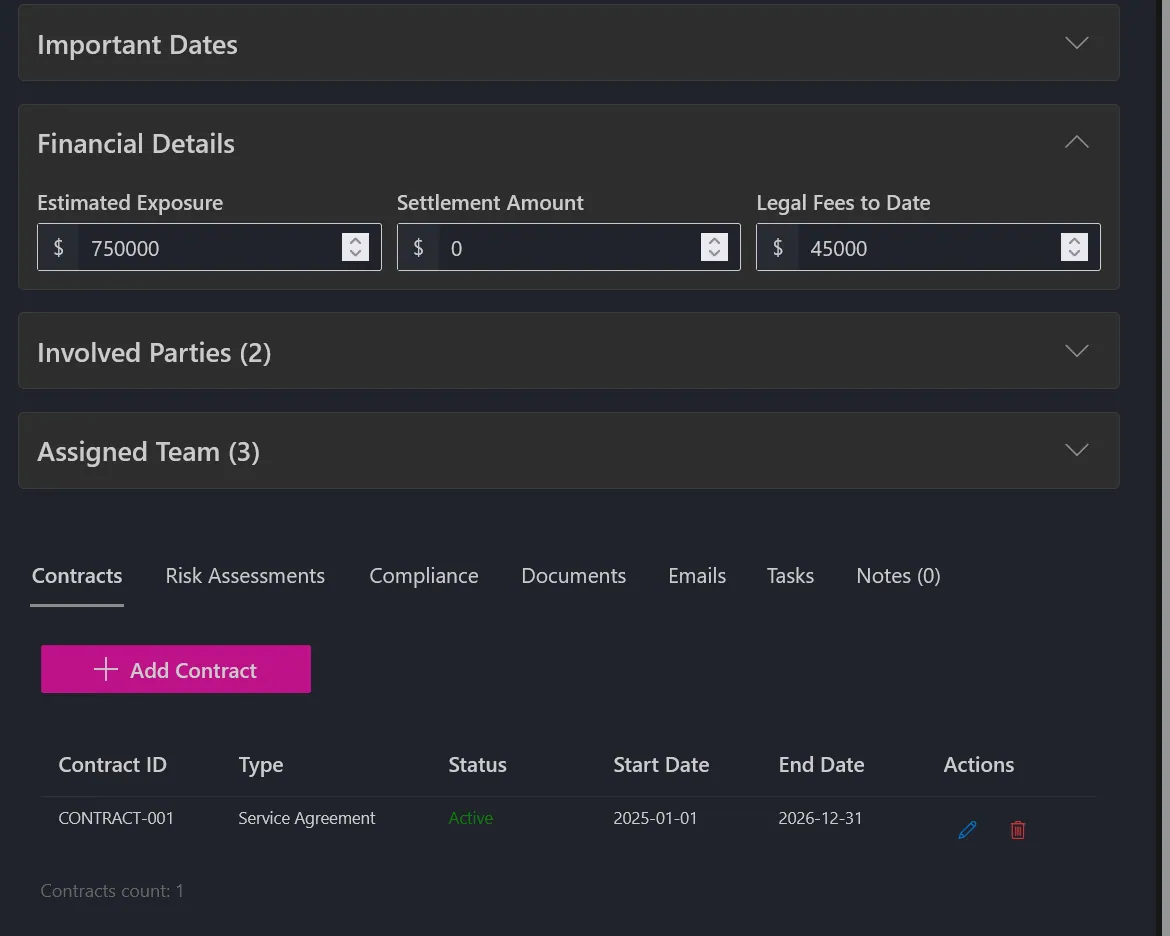
Grounded in your own matters and running on your own Azure OpenAI configuration the data it reasons over never leaves the tenant.
- It briefs you on arrival active matters, contracts expiring within 90 days, high-value and auto-renewing agreements, risk, compliance and exposure.
- Ask in plain language it queries the real record across 20+ filters: type, status, priority, jurisdiction, lawyer, party, exposure range, stage, legal hold, court and tags.
- Contracts, found properly by type, party, governing law, value range, what expires in a window, what auto-renews, what needs notice served.
- And the documents contracts read automatically by Azure Document Intelligence and indexed, so the assistant answers from their contents.
8 · Automation no-code legal workflows
The six legal events feed the platform's full automation engine, on a drag-and-drop canvas inside Teams.
- Draw the process conditions, switches, loops, parallel branches, variables, delays and reusable sub-workflows. No code, no premium automation tier.
- 40+ actions email, SharePoint, document generation, Planner tasks, AI extraction and the five legal query tools.
- People in the loop approvals wait days or weeks with approved/rejected/timeout branches; links are signed and time-limited.
- Prove it before it goes live validation flags problems on the canvas, a dry run shows what each step resolved, and run history records every execution.
- Describe it and let AI build it plain-language problem in, feasibility-checked workflows out, ready to generate onto the canvas.
9 · Security, residency & isolation
Matters, contracts and their evidence stay in your own Microsoft 365 and Azure tenant. Documents remain in SharePoint, email in Outlook and tasks in Planner, governed by the controls already in place. A workflow runs as the person who owns it with delegated permissions, it can never reach data that person couldn't reach themselves. Workflow definitions and run history sit in per-tenant storage, and the assistant runs on your own Azure OpenAI matter data is never sent to a shared service.
Against traditional legal and contract-management platforms
Dedicated legal platforms are capable products. The essential difference is one of approach: they ask the team to move its matters, documents and mail into a separate system and to work in a separate application. pEntities leaves everything where it already is and adds the legal layer over it, inside Teams.
In short: because you already run on Microsoft 365, pEntities delivers the structure, visibility and automation of a dedicated legal platform without the migration, the separate application, or the loss of control over your own data.
Purpose-built modules for the work your teams actually do
One platform, four specialised modules each with its own domain AI agent, all running inside Microsoft Teams on the data you already own.
HR Module
The full employee lifecycle onboarding with automatic task lists, leave with multi-level approval, performance reviews, training tracked to its expiry date and payroll analysis. The HR agent spots compliance risks and writes the reports for you.
Explore HR →Legal Module
Every case tracked from pre-trial to appeal, court, lawyers, opponents, confidentiality level, financial exposure and risk. Contracts carry milestones, auto-renewal detection and signature history, while the agent analyses timelines and exposure scenarios.
Explore Legal →Ticketing Module
Every request handled with precision IT, HR, finance or legal. Real-time tracking, automatic notifications, approval flows and full history, with priorities, SLAs and automation rules that work without anyone intervening.
Explore Ticketing →Finance Module
Invoices, expenses, purchases, budgets, receivables and tax data organised by fiscal year. Every figure links back to its original email, document and approval task full traceability, and an agent that spots trends and deviations.
Explore Finance →Frequently asked questions
Can Meta-365 extract clauses from contracts automatically?
Yes. The legal module uses AI clause extraction to identify parties, dates, obligations and risk terms from uploaded contracts, and surfaces them for review rather than requiring manual reading.
Is contract data sent to an external AI service outside my tenant?
No. Meta-365 runs as a managed application inside your own Microsoft 365 tenant, so documents, emails and records stay in your existing SharePoint, Outlook and Planner. There is no migration to a vendor cloud and no new data silo to security-review.
What else does the legal module handle?
The legal module covers full contract lifecycle management, hearing and deadline tracking, conflict-of-interest checks and legal analytics, in addition to AI clause extraction.
Does it replace our document management system?
It can. Contracts and matter files are stored in your existing SharePoint with version comparison, audit trail, redaction and retention policies applied, so a separate legal DMS is often unnecessary.